So I was wondering if anyone knows if DOORs records not only the date a user last changed their password but also if it includes the time as well.
I know about going into individual users accounts and the security tab to see the date it was changed, but is it possible for a dxl script like this
User u = find()

Date LastChange = u.passwordLastChange
Date init = dateAndTime(LastChange)

string strName
strName=u.name

print strName "\t" stringOf(LastChange) "\t" init ""
to somehow also include the exact time it was changed?
As of right now the only information I get is:
USERNAME Tuesday, November 15, 2016 11/15/16 00:00:00
and it only ever shows 00:00:00
MrNiceGuy - Mon Feb 06 17:13:57 EST 2017
Re: Users Password Last Changed question
Mathias Mamsch - Wed Feb 08 04:10:04 EST 2017
I just checked inside the DB files. It seems the Date is not stored with a time inside the user file, so you might be out of luck.
Inside the password history files, you have a timestamp, but I am not sure you can access them with DXL.
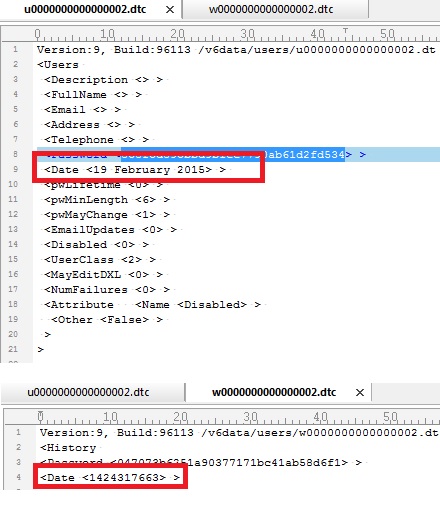
Maybe that helps, regards, Mathias
Re: Users Password Last Changed question
MrNiceGuy - Wed Feb 08 11:32:45 EST 2017
Mathias Mamsch - Wed Feb 08 04:10:04 EST 2017
I just checked inside the DB files. It seems the Date is not stored with a time inside the user file, so you might be out of luck.
Inside the password history files, you have a timestamp, but I am not sure you can access them with DXL.
Maybe that helps, regards, Mathias
Well that's unfortunate, you would think that a DDBA would have some way to tell if a user has changed their password or a variable that would contain this data.
As of right now when a user requests a password reset we have no way of telling if they change their password after they get access again.
But thanks for the reply Mathias helps a lot.
Re: Users Password Last Changed question
Mathias Mamsch - Wed Feb 08 13:35:56 EST 2017
MrNiceGuy - Wed Feb 08 11:32:45 EST 2017
Well that's unfortunate, you would think that a DDBA would have some way to tell if a user has changed their password or a variable that would contain this data.
As of right now when a user requests a password reset we have no way of telling if they change their password after they get access again.
But thanks for the reply Mathias helps a lot.
Sorry - this does not seem to work -
You sure can. The Administrator user can read the password hashes from the database:
User u = find("Customer")
string s = u.password
print s
This should allow you to store the hash of the password after reset and compare to the current password. Regards, Mathias
Re: Users Password Last Changed question
MrNiceGuy - Wed Feb 08 15:55:54 EST 2017
Mathias Mamsch - Wed Feb 08 13:35:56 EST 2017
Sorry - this does not seem to work -
You sure can. The Administrator user can read the password hashes from the database:
User u = find("Customer")
string s = u.password
print s
This should allow you to store the hash of the password after reset and compare to the current password. Regards, Mathias
oh wow I had no idea, thanks a ton for that Mathias.
This will definitely help
Re: Users Password Last Changed question
PekkaMakinen - Thu Feb 09 01:29:13 EST 2017
Mathias Mamsch - Wed Feb 08 13:35:56 EST 2017
Sorry - this does not seem to work -
You sure can. The Administrator user can read the password hashes from the database:
User u = find("Customer")
string s = u.password
print s
This should allow you to store the hash of the password after reset and compare to the current password. Regards, Mathias
This is new to me, the DXL reference states that the password property is "write-only". Trying it out on my DOORS 9.6.0.3 nothing was output from the password properties - has this functionality been modified in later versions?
Re: Users Password Last Changed question
Mathias Mamsch - Thu Feb 09 03:36:35 EST 2017
PekkaMakinen - Thu Feb 09 01:29:13 EST 2017
This is new to me, the DXL reference states that the password property is "write-only". Trying it out on my DOORS 9.6.0.3 nothing was output from the password properties - has this functionality been modified in later versions?
Did you try as "Administrator"? I think this only works for that user. Regards, Mathias
Re: Users Password Last Changed question
PekkaMakinen - Thu Feb 09 04:03:54 EST 2017
Mathias Mamsch - Thu Feb 09 03:36:35 EST 2017
Did you try as "Administrator"? I think this only works for that user. Regards, Mathias
Yes, did run as Administrator. No success.
Re: Users Password Last Changed question
Mathias Mamsch - Thu Feb 09 04:15:23 EST 2017
PekkaMakinen - Thu Feb 09 04:03:54 EST 2017
Yes, did run as Administrator. No success.
Weird. Then I think it might have been a mistake by me...
I tried this on an old database. The first time I ran this code I got also nothing, then I changed the password over the GUI, run the code again and got a result. I thought the user did not have a password before - but I think I only got a hash, because I set the password earlier and it was still in the user record.
Can you verify, that changing the password over the GUI will have the code work (once) for you too?
Regards, Mathias
Re: Users Password Last Changed question
Mathias Mamsch - Thu Feb 09 04:22:06 EST 2017
MrNiceGuy - Wed Feb 08 11:32:45 EST 2017
Well that's unfortunate, you would think that a DDBA would have some way to tell if a user has changed their password or a variable that would contain this data.
As of right now when a user requests a password reset we have no way of telling if they change their password after they get access again.
But thanks for the reply Mathias helps a lot.
Coming back to your original problem - I know people have made their password reset scripts so, that the user is forced to change his password. Would this not solve the issue? Regards, Mathias
Re: Users Password Last Changed question
PekkaMakinen - Thu Feb 09 04:34:17 EST 2017
Mathias Mamsch - Thu Feb 09 04:15:23 EST 2017
Weird. Then I think it might have been a mistake by me...
I tried this on an old database. The first time I ran this code I got also nothing, then I changed the password over the GUI, run the code again and got a result. I thought the user did not have a password before - but I think I only got a hash, because I set the password earlier and it was still in the user record.
Can you verify, that changing the password over the GUI will have the code work (once) for you too?
Regards, Mathias
Hi, running with my own Database Manager account I could get it to print my own password hash. As Administrator it did print out hash for one of our accounts used for DOORS backup (don't know why) but nothing else. When as Administrator I changed the password to my own account, it did print the hash for my password - but when I closed DOORS and reopened an Administrator session it did not print this anymore.
So: as a normal user (which is in the userList) you can print out your own password hash. As Administrator (which is not in the userList) you can print out those password hashes changed in the same session - but these values are not available in later Administrator sessions. And this tested in 32 bit 9.6.0.3.
Re: Users Password Last Changed question
MrNiceGuy - Thu Feb 09 09:29:29 EST 2017
Mathias Mamsch - Thu Feb 09 04:22:06 EST 2017
Coming back to your original problem - I know people have made their password reset scripts so, that the user is forced to change his password. Would this not solve the issue? Regards, Mathias
Yea it would but everything I've read suggest that DOORS only forces a user to reset their password when they first log onto their account for the very first time.
So there is a way to force someone to reset their password after its reset?
Re: Users Password Last Changed question
MrNiceGuy - Thu Feb 09 11:22:33 EST 2017
PekkaMakinen - Thu Feb 09 04:34:17 EST 2017
Hi, running with my own Database Manager account I could get it to print my own password hash. As Administrator it did print out hash for one of our accounts used for DOORS backup (don't know why) but nothing else. When as Administrator I changed the password to my own account, it did print the hash for my password - but when I closed DOORS and reopened an Administrator session it did not print this anymore.
So: as a normal user (which is in the userList) you can print out your own password hash. As Administrator (which is not in the userList) you can print out those password hashes changed in the same session - but these values are not available in later Administrator sessions. And this tested in 32 bit 9.6.0.3.
So this is how I have it to work so far, im still tinkering with it but so far this has worked.
User   user
bool DisAccnt = false
int i = 1

for user in userList do
 {
 DisAccnt = user.disabled
 if (DisAccnt == false)
  {
  string              strName
  strName                   = user.name
  string UserEmail       = user.email
  string SysName         = user.systemLoginName
  string HashPW          = user.password
  print "\t" strName "\t" UserEmail "\t" SysName "\t" HashPW "\n"
  i = i + 1
  }
 }
I do it like this so that I am only getting the Hashed PW of accounts that are not disabled.
Again im still tinkering with it and trying to come up with something that is more efficient but this works so far how ive wanted it
But if Mathias knows of a way to force a user to reset their password similar to when a new user logs on the first time, that would make things so much easier
Re: Users Password Last Changed question
MrNiceGuy - Thu Feb 09 11:31:15 EST 2017
PekkaMakinen - Thu Feb 09 04:34:17 EST 2017
Hi, running with my own Database Manager account I could get it to print my own password hash. As Administrator it did print out hash for one of our accounts used for DOORS backup (don't know why) but nothing else. When as Administrator I changed the password to my own account, it did print the hash for my password - but when I closed DOORS and reopened an Administrator session it did not print this anymore.
So: as a normal user (which is in the userList) you can print out your own password hash. As Administrator (which is not in the userList) you can print out those password hashes changed in the same session - but these values are not available in later Administrator sessions. And this tested in 32 bit 9.6.0.3.
Also I know what you are talking about, how it wont show the hashed PW when you search for someone, I had the same issue when I first tried it. But I think what needs to happen before you search is you have to I guess que the user list first. (If that makes sense)
If I run the default script Mathias provided I get the same issue where it wont show anything, but if I run my script first, (above) afterwards I am able to search for individual users without any issues.
Re: Users Password Last Changed question
PekkaMakinen - Fri Feb 10 00:53:11 EST 2017
MrNiceGuy - Thu Feb 09 11:31:15 EST 2017
Also I know what you are talking about, how it wont show the hashed PW when you search for someone, I had the same issue when I first tried it. But I think what needs to happen before you search is you have to I guess que the user list first. (If that makes sense)
If I run the default script Mathias provided I get the same issue where it wont show anything, but if I run my script first, (above) afterwards I am able to search for individual users without any issues.
Yes, something interesting is happening. When I now run your code, I can get the password hashes - but with simpler code which I wrote
User u
for u in userList do
{
string HashPW = u.password
print HashPW "\n"
}
I cannot access the password hashes. But it works if I add loadUserRecord(u) to the loop, so the additional queries you had (user name etc.) performed that.
BTW this works even with my Database Manager account, no need for Adminstrator
Re: Users Password Last Changed question
Mathias Mamsch - Fri Feb 10 03:45:07 EST 2017
MrNiceGuy - Thu Feb 09 11:22:33 EST 2017
So this is how I have it to work so far, im still tinkering with it but so far this has worked.
User   user
bool DisAccnt = false
int i = 1

for user in userList do
 {
 DisAccnt = user.disabled
 if (DisAccnt == false)
  {
  string              strName
  strName                   = user.name
  string UserEmail       = user.email
  string SysName         = user.systemLoginName
  string HashPW          = user.password
  print "\t" strName "\t" UserEmail "\t" SysName "\t" HashPW "\n"
  i = i + 1
  }
 }
I do it like this so that I am only getting the Hashed PW of accounts that are not disabled.
Again im still tinkering with it and trying to come up with something that is more efficient but this works so far how ive wanted it
But if Mathias knows of a way to force a user to reset their password similar to when a new user logs on the first time, that would make things so much easier
Did you try resetting user passwords like this:
u = find("testuser")
u.password = "test1"
u.passwordLifetime = -1
saveDirectory()
This forces me to change the password on login. Combined with the Database Setting "Passwords before the same password can be used again" this could be a solution!
Regards, Mathias
Re: Users Password Last Changed question
Bill_B. - Thu Feb 16 14:13:38 EST 2017
Hello Mathias et al...
This is a subject that I have kept an eye on for years and really though we had a winner...but this forces the user to change their password on every login until the lifetime is set to a positive number...so close yet so far...
Re: Users Password Last Changed question
MrNiceGuy - Thu Feb 16 16:14:17 EST 2017
Bill_B. - Thu Feb 16 14:13:38 EST 2017
Hello Mathias et al...
This is a subject that I have kept an eye on for years and really though we had a winner...but this forces the user to change their password on every login until the lifetime is set to a positive number...so close yet so far...
So what I do with this script is I reset the users password and set the expiration date to -1
While im on the phone with them and after they login and reset their own password I then run the same script again but without the password change and i set u.passwordLiftime = 90