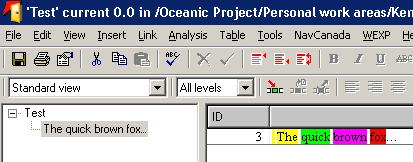
Is it possible to highlight specific portions of the object text in different colors(no dxl)? I assume the answer is no but just wanted to know for sure.
|
Re: Highlight Text in different colors AAI Services, Textron dpechacek@sc-aaicorp.com David.Pechacek@gmail.com |
Re: Highlight Text in different colors dpechacek - Fri Jan 23 08:00:25 EST 2009 Ken. Joined Telelogic DOORS forum 12-Sep-2003. DOORS 8.2, running on Windows 2000 Server, accessed via Citrix. Attachments attachment_14208292_highlighting.JPG |
Re: Highlight Text in different colors mcnairk - Fri Jan 23 08:22:22 EST 2009 Am talking about a lot of requirements..copying to Word and back would be a chore :( Moreover, it's been quite a task getting people to use DOORS..so using Word is not something am gonna encourage.. For now I have suggested that they use B I and U to highlight. |
Re: Highlight Text in different colors SystemAdmin - Mon Jan 26 17:41:54 EST 2009 Ken. |
Re: Highlight Text in different colors 1.) As mentioned, you can cut-and-paste back and forth with Word and get the RTF tags into the main column 2.) You can create a layout DXL column that uses RTF tags to get color highlights. Of course, this applies to the layout column and is not part of the standard object heading or object text. 3.) You can also get color highlights in richText and richField dialog box elements, using the proper RTF tags and color table stuff. 4.) It seems theoretically possible that you could create a menu of add-in functions that handle color highlighting, and possibly connect the add-ins to keyboard shortcuts to make it somewhat less painful. |
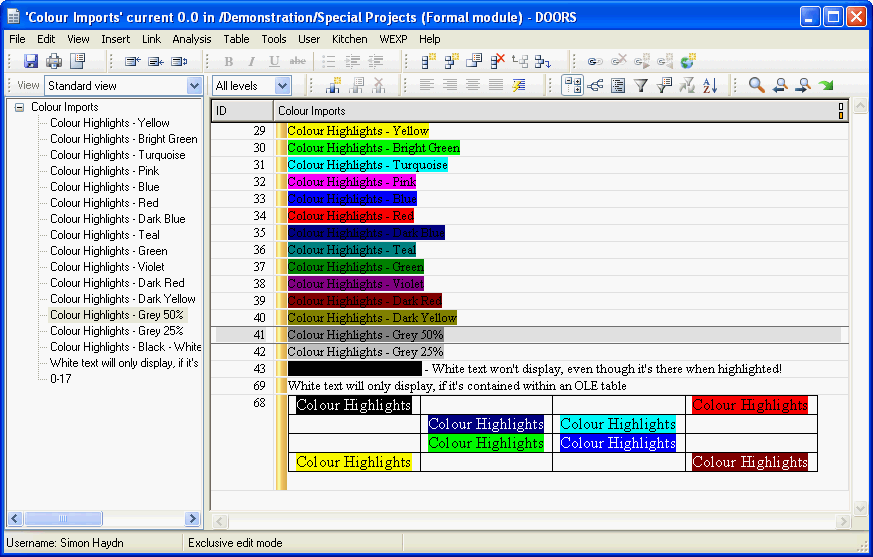
Re: Highlight Text in different colors SystemAdmin - Mon Jan 26 17:41:54 EST 2009 the other option is to import the Word document itself, as the Word DOORS Exporter function will retain any colour highlighting (it's how I realised DOORS could support colour highlighting). I also keep a Colour Imports module handy (see attached), as it contains all the possible variations. Personally, I would use colour highlighting as a last resort and using Bold/Underline is usually enough. Adding colour looks good, but sometimes it can mask the important things, like your requirements... Simon Haydn BSc (Hons) Requirements Controller Marshall Aerospace (UK) Attachments attachment_14212031_Colour_Imports_Module.gif |