Hi all,
I'm completelly new to DOORS and DXL. The problem I have is the same, as allready described here:
Link
In the DXL-Interaction window I print this code, as suggested in the link above:
if(obj."isRequirement"){
obj.attrDXLName = "SR-" probeAttr_(obj."Absolute Number")
}
else{
obj.attrDXLName = ""
}
But that doesn't function because of two failures:
-E- DXL: <Line:2> wrong arguments for the function (probeAttr_)
-E- DXL: <Line:1> wrong arguments for if)
Does anybody have an idea, what I'm doing wrong?
regards
Alex
SystemAdmin - Fri Jun 22 11:24:02 EDT 2012 |
|
Re: Unique ID dependent on an other object attribute
llandale - Fri Jun 22 12:58:24 EDT 2012
probeAttr_ has two parameters Object and string; change your period to a comma:
-
obj.attrDXLName = "SR-" probeAttr_(obj, "Absolute Number")
|
|
Re: Unique ID dependent on an other object attribute
SystemAdmin - Fri Jun 22 13:18:34 EDT 2012 llandale - Fri Jun 22 12:58:24 EDT 2012
probeAttr_ has two parameters Object and string; change your period to a comma:
-
obj.attrDXLName = "SR-" probeAttr_(obj, "Absolute Number")
I've already figured it out in \lib\dxl\utils\attrutil.inc file.
But I still get a failure with the if-condition. In my Module the attribute "isRequirement" is of type boolean. So if obj."Requirement" is true for an object, operation "obj.attrDXLName = "SR-" probeAttr_(obj, "Absolute Number")" will be executed, right?
regards
Alex
|
|
Re: Unique ID dependent on an other object attribute
llandale - Fri Jun 22 13:48:50 EDT 2012 SystemAdmin - Fri Jun 22 13:18:34 EDT 2012
Thanks,
I've already figured it out in \lib\dxl\utils\attrutil.inc file.
But I still get a failure with the if-condition. In my Module the attribute "isRequirement" is of type boolean. So if obj."Requirement" is true for an object, operation "obj.attrDXLName = "SR-" probeAttr_(obj, "Absolute Number")" will be executed, right?
regards
Alex
-
bool IsReq = obj."IsRequirement"; if (IsReq).. // assigning it retrieves it
-
if (bool obj."IsRequirement") .. // type it forces retrieval
-
if (obj."IsRequirement" "" == "True") ... // Retrieve and convert to string
-Louie
Notice that boolean true/false convert to string "True"/"False", with a capital letter.
|
|
Re: Unique ID dependent on an other object attribute
SystemAdmin - Fri Jun 22 15:42:27 EDT 2012 llandale - Fri Jun 22 13:48:50 EDT 2012
Oh yes. does not retrieve the value by itself, its an "AttrRef__". You need to induce it to retrieve the value, which you can do with the = sign, or contatenate it or type it. I'm thinking any of these will work:
-
bool IsReq = obj."IsRequirement"; if (IsReq).. // assigning it retrieves it
-
if (bool obj."IsRequirement") .. // type it forces retrieval
-
if (obj."IsRequirement" "" == "True") ... // Retrieve and convert to string
-Louie
Notice that boolean true/false convert to string "True"/"False", with a capital letter.
Ok, that seems to function with the following result.
I got now:
-R-E- DXL: <Line:4> unassigned variable (obj)
-I- DXL: execution halted
Here the code:
Module m = current
Object obj

bool isReq = obj."isRequirement"
if (isReq){
obj.attrDXLName = "SR-" probeAttr_(obj, "Absolute Number")
}
else{
obj.attrDXLName = ""
}
regards,
Alex
|
|
Re: Unique ID dependent on an other object attribute
llandale - Fri Jun 22 15:59:47 EDT 2012 SystemAdmin - Fri Jun 22 15:42:27 EDT 2012
Ok, that seems to function with the following result.
I got now:
-R-E- DXL: <Line:4> unassigned variable (obj)
-I- DXL: execution halted
Here the code:
Module m = current
Object obj

bool isReq = obj."isRequirement"
if (isReq){
obj.attrDXLName = "SR-" probeAttr_(obj, "Absolute Number")
}
else{
obj.attrDXLName = ""
}
regards,
Alex
In AttrDXL and Layouts, variable "obj" is defined to mean "this" object. If you remove "Object obj" then the pre-defined (in global context) variables is used and it should work. And I see you don't need "Module m = current" since you don't use "m" anywhere.
-Louie
|
|
Re: Unique ID dependent on an other object attribute
SystemAdmin - Sat Jun 23 08:00:03 EDT 2012 llandale - Fri Jun 22 15:59:47 EDT 2012
I guess I should read the entire code.
In AttrDXL and Layouts, variable "obj" is defined to mean "this" object. If you remove "Object obj" then the pre-defined (in global context) variables is used and it should work. And I see you don't need "Module m = current" since you don't use "m" anywhere.
-Louie
that is my entire code. As I mentioned, I'm a newbee in DXL and DOORS. Respectively my projects are really small, because I try to learn by doing on my own.
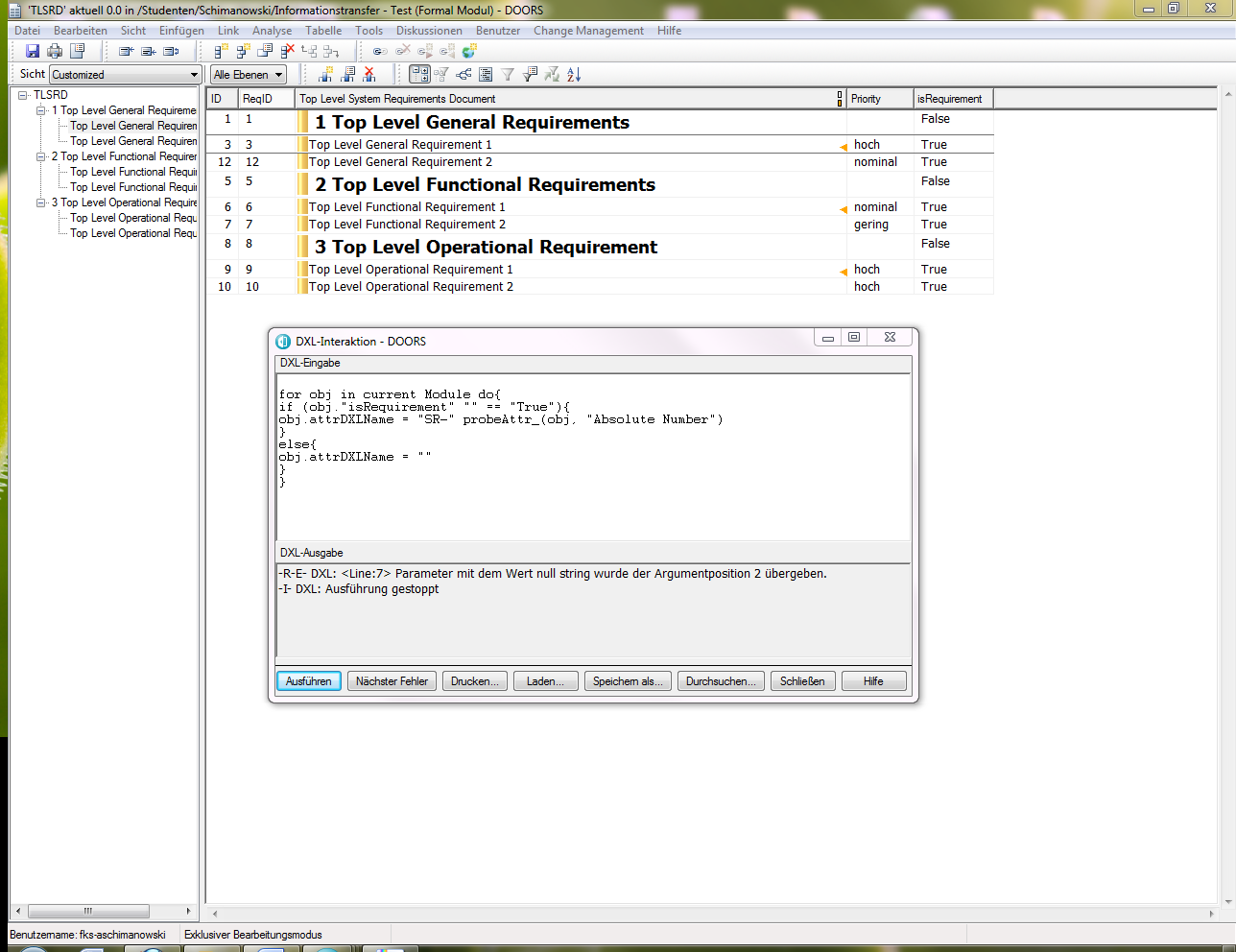
I attached a screenshot, which displays the module and the dxl code. The column "ID" gives the "Object Identifier" , "ReqID" gives the "Absolute Number", "isRequirement" gives the "isRequirement" attribute.
1. The condition if... else... is ok. I figured it out by changing the value of "isRequirement" in the Module, so the error message refers to an other line.
2. probeAttr_(obj, "Absolute Number") probes the readability of "Absolute Number" attribute and returns empty string if not readable. Which output does it produce in the case, it is readable? The value of the attribute also as a string?
3. attrDXLName refers to the attribute value under considering. Then, a definition of an attribute of type string, e.g. ReqID, is necessary, right?
By executing the code, as shown in the screenshot. I got a an error:
-R-E- DXL: null string parameter was passed into argument position 2
-Alex
Attachments
attachment_14847776_screenshot_1.PNG
|
|
Re: Unique ID dependent on an other object attribute
llandale - Mon Jun 25 13:19:46 EDT 2012 SystemAdmin - Sat Jun 23 08:00:03 EDT 2012
hi Louie,
that is my entire code. As I mentioned, I'm a newbee in DXL and DOORS. Respectively my projects are really small, because I try to learn by doing on my own.
I attached a screenshot, which displays the module and the dxl code. The column "ID" gives the "Object Identifier" , "ReqID" gives the "Absolute Number", "isRequirement" gives the "isRequirement" attribute.
1. The condition if... else... is ok. I figured it out by changing the value of "isRequirement" in the Module, so the error message refers to an other line.
2. probeAttr_(obj, "Absolute Number") probes the readability of "Absolute Number" attribute and returns empty string if not readable. Which output does it produce in the case, it is readable? The value of the attribute also as a string?
3. attrDXLName refers to the attribute value under considering. Then, a definition of an attribute of type string, e.g. ReqID, is necessary, right?
By executing the code, as shown in the screenshot. I got a an error:
-R-E- DXL: null string parameter was passed into argument position 2
-Alex
Your screen shot shows you running code from the interaction window and thus is "On-Demand". I see you are getting a run-time error (-R-E-) and I'm pretty sure it says "attrDXLName" is null at line 7.
The pre-defined "obj" and "attrDXLName" variables applies ONLY to code running as an Attr-DXL. Since you are running "on-demand" those values are null. You create Attr-DXL via the Edit menu >>Attributes menu. Create a string attribute named lets say "MyUniqueId", click the "Attr-DXL" button, http://Browse.. New, and paste your code into that DXL window (that window looks somewhat different than this one); then same that attribute. Then insert that attyribute into your view, then presumably save the view.
-Louie
Forget all that.
Do what most folks do and use the Object Identifier as your unique Requierments ID. I see that your "ID" field looks exactly like your "Absolute Number" field. You should edit the module, File menu >>Properties, and add a "Prefix" to the module, lets say "SR-". You will then see the "ID" change, and viola you can now get rid of your attr DXL which does the same thing.
Object Identifier is composed of the Module prefix concated with the Absolute Number.
By convention you should make sure your Prefixes in the project are as unique as are your module names. Ending Prefixes with "-" or "_" is a no brainer.
|
|
Re: Unique ID dependent on an other object attribute
SystemAdmin - Sun Jul 01 16:48:43 EDT 2012 llandale - Mon Jun 25 13:19:46 EDT 2012
There are 4 classes of DXL: "Trigger", "Layout", "Attr-DXL", and what I call "On-Demand"; these classes are determined by how the code is initiated. You are not ready for Triggers. Layout is code in a column stored in a view. Attr-DXL is code stored in an attribute and determines it's value. Attr-DXL and Layouts are very similar, they fire when there is a request for an object value (Attr-DXL is superior). On-Demand is code you run from the DXL interaction window and from various menues.
Your screen shot shows you running code from the interaction window and thus is "On-Demand". I see you are getting a run-time error (-R-E-) and I'm pretty sure it says "attrDXLName" is null at line 7.
The pre-defined "obj" and "attrDXLName" variables applies ONLY to code running as an Attr-DXL. Since you are running "on-demand" those values are null. You create Attr-DXL via the Edit menu >>Attributes menu. Create a string attribute named lets say "MyUniqueId", click the "Attr-DXL" button, http://Browse.. New, and paste your code into that DXL window (that window looks somewhat different than this one); then same that attribute. Then insert that attyribute into your view, then presumably save the view.
-Louie
Forget all that.
Do what most folks do and use the Object Identifier as your unique Requierments ID. I see that your "ID" field looks exactly like your "Absolute Number" field. You should edit the module, File menu >>Properties, and add a "Prefix" to the module, lets say "SR-". You will then see the "ID" change, and viola you can now get rid of your attr DXL which does the same thing.
Object Identifier is composed of the Module prefix concated with the Absolute Number.
By convention you should make sure your Prefixes in the project are as unique as are your module names. Ending Prefixes with "-" or "_" is a no brainer.
thanks a lot! That's exactly, what I was looking for.
Actually I need two attributes ID and ReqID (if Req=true). Thats the reason why I didn't use the native ID with a Prefix.
Regards
Alex
|
|