Hello, |
Re: Bullet + DXL-Layout I mean you could go into the dark land of trying to remove the paragraph break after the bullet list, but it seems to me that this is a kind of "ignore me". Is someone worried about the extra bullet in some document? Maybe you tell them: "get out!" ;-) Seriously if what I hear from your post is true, I see no other way then awkwardly removing the bullet from the RTF which is in my eyes a no-wanna-go-there. I wrote an RTF parser in DXL for a similar purpose and it did not pay off - editing richText programmatically is just no fun. Maybe this helps, although I doubt it. Regards, Mathias Mathias Mamsch, IT-QBase GmbH, Consultant for Requirement Engineering and D00RS |
Re: Bullet + DXL-Layout Mathias Mamsch - Tue Aug 21 10:55:37 EDT 2012 Mathias Mamsch, IT-QBase GmbH, Consultant for Requirement Engineering and D00RS Thank you, -Jim Attachments attachment_14877669_displayRichWithOle.dpa |
Re: Bullet + DXL-Layout
-Louie |
Re: Bullet + DXL-Layout llandale - Tue Aug 21 15:23:07 EDT 2012
-Louie |
Re: Bullet + DXL-Layout SystemAdmin - Tue Aug 21 15:56:26 EDT 2012
Okay, i found a solution (cannot explain 100% why though). Change the following code in the analysis wizard:
displayRich("\\pard " " ")
else
displayRich("\\pard " s)
displayRich(" ")
else
displayRich(s)
Mathias Mamsch, IT-QBase GmbH, Consultant for Requirement Engineering and D00RS
|
Re: Bullet + DXL-Layout Mathias Mamsch - Tue Aug 21 17:14:24 EDT 2012
Okay, i found a solution (cannot explain 100% why though). Change the following code in the analysis wizard:
displayRich("\\pard " " ")
else
displayRich("\\pard " s)
displayRich(" ")
else
displayRich(s)
Mathias Mamsch, IT-QBase GmbH, Consultant for Requirement Engineering and D00RS
I'm sorry to say that didn't work for me. -Jim |
Re: Bullet + DXL-Layout SystemAdmin - Wed Aug 22 11:02:27 EDT 2012 Mathias Mamsch, IT-QBase GmbH, Consultant for Requirement Engineering and D00RS Attachments attachment_14878376_bullet.zip |
Re: Bullet + DXL-Layout Mathias Mamsch - Thu Aug 23 02:55:35 EDT 2012 Mathias Mamsch, IT-QBase GmbH, Consultant for Requirement Engineering and D00RS your solution doesn't seem to work for DOORS 9.3.0.7. -Jim |
Re: Bullet + DXL-Layout SystemAdmin - Fri Aug 24 15:07:35 EDT 2012 Mathias Mamsch, IT-QBase GmbH, Consultant for Requirement Engineering and D00RS |
Re: Bullet + DXL-Layout Mathias Mamsch - Fri Aug 24 15:18:53 EDT 2012 Mathias Mamsch, IT-QBase GmbH, Consultant for Requirement Engineering and D00RS -Jim |
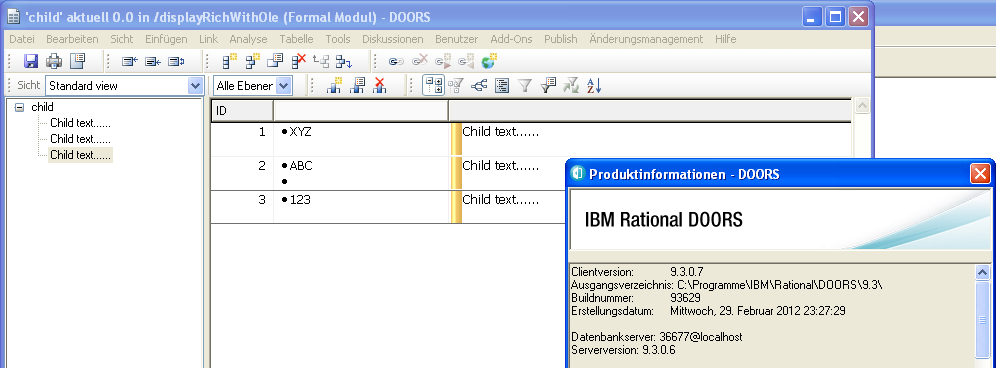
Re: Bullet + DXL-Layout SystemAdmin - Fri Aug 24 15:54:25 EDT 2012 Installed 9.3.0.7 ... Performed the same steps you described. Still get the correct result (see screenshot, is this what you were expecting, but not getting??). We seem to be doing something differently or seem to be talking about different problems. I restored the dpa you attached and I open the child module, create a new DXL layout column with the following code.
// DXL generated by DOORS traceability wizard on 23 August 2012.
// Wizard version 2.0, DOORS version 9.3.0.6
pragma runLim, 0
void showOut(Object o, int depth) {
    Link l
    LinkRef lr
    ModName_ otherMod = null
    Module linkMod = null
    ModuleVersion otherVersion = null
    Object othero
    string disp = null
    string s = null
    string plain, plainDisp
    int plainTextLen
    int count
    bool doneOne = false
    string linkModName = "*"
    for l in all(o->linkModName) do {
        otherVersion = targetVersion l
        otherMod = module(otherVersion)
        if (null otherMod || isDeleted otherMod) continue
        othero = target l
        if (null othero) {
            load(otherVersion,false)
        }
        othero = target l
        if (null othero) continue
        if (isDeleted othero) continue
        doneOne = true
        if (depth == 1) {
            s = probeRichAttr_(othero,"Object Text", false)
            if (s == "")
            displayRich(" ")
            else
            displayRich( s)
        }
    }
    if (depth == 1) {
        ExternalLink extLink
        doneOne = false
        for extLink in o->"" do {
            if (!doneOne) {
                displayRich("{\\b External Links:}")
                doneOne = true
            }
        }
    }
}
showOut(obj,1)
string s = richTextWithOle (obj."Object Text")
displayRich s
Mathias Mamsch, IT-QBase GmbH, Consultant for Requirement Engineering and D00RS
Attachments attachment_14879219_bullet_9_3_0_7.png |
Re: Bullet + DXL-Layout Mathias Mamsch - Fri Aug 24 16:33:31 EDT 2012 Installed 9.3.0.7 ... Performed the same steps you described. Still get the correct result (see screenshot, is this what you were expecting, but not getting??). We seem to be doing something differently or seem to be talking about different problems. I restored the dpa you attached and I open the child module, create a new DXL layout column with the following code.
// DXL generated by DOORS traceability wizard on 23 August 2012.
// Wizard version 2.0, DOORS version 9.3.0.6
pragma runLim, 0
void showOut(Object o, int depth) {
    Link l
    LinkRef lr
    ModName_ otherMod = null
    Module linkMod = null
    ModuleVersion otherVersion = null
    Object othero
    string disp = null
    string s = null
    string plain, plainDisp
    int plainTextLen
    int count
    bool doneOne = false
    string linkModName = "*"
    for l in all(o->linkModName) do {
        otherVersion = targetVersion l
        otherMod = module(otherVersion)
        if (null otherMod || isDeleted otherMod) continue
        othero = target l
        if (null othero) {
            load(otherVersion,false)
        }
        othero = target l
        if (null othero) continue
        if (isDeleted othero) continue
        doneOne = true
        if (depth == 1) {
            s = probeRichAttr_(othero,"Object Text", false)
            if (s == "")
            displayRich(" ")
            else
            displayRich( s)
        }
    }
    if (depth == 1) {
        ExternalLink extLink
        doneOne = false
        for extLink in o->"" do {
            if (!doneOne) {
                displayRich("{\\b External Links:}")
                doneOne = true
            }
        }
    }
}
showOut(obj,1)
string s = richTextWithOle (obj."Object Text")
displayRich s
Mathias Mamsch, IT-QBase GmbH, Consultant for Requirement Engineering and D00RS
Object 2 is showing two bullets when in the parent there is only one being displayed in the Module. -Jim |
Re: Bullet + DXL-Layout SystemAdmin - Fri Aug 24 16:58:35 EDT 2012 -Jim |
Re: Bullet + DXL-Layout Mathias Mamsch - Fri Aug 24 16:33:31 EDT 2012 Installed 9.3.0.7 ... Performed the same steps you described. Still get the correct result (see screenshot, is this what you were expecting, but not getting??). We seem to be doing something differently or seem to be talking about different problems. I restored the dpa you attached and I open the child module, create a new DXL layout column with the following code.
// DXL generated by DOORS traceability wizard on 23 August 2012.
// Wizard version 2.0, DOORS version 9.3.0.6
pragma runLim, 0
void showOut(Object o, int depth) {
    Link l
    LinkRef lr
    ModName_ otherMod = null
    Module linkMod = null
    ModuleVersion otherVersion = null
    Object othero
    string disp = null
    string s = null
    string plain, plainDisp
    int plainTextLen
    int count
    bool doneOne = false
    string linkModName = "*"
    for l in all(o->linkModName) do {
        otherVersion = targetVersion l
        otherMod = module(otherVersion)
        if (null otherMod || isDeleted otherMod) continue
        othero = target l
        if (null othero) {
            load(otherVersion,false)
        }
        othero = target l
        if (null othero) continue
        if (isDeleted othero) continue
        doneOne = true
        if (depth == 1) {
            s = probeRichAttr_(othero,"Object Text", false)
            if (s == "")
            displayRich(" ")
            else
            displayRich( s)
        }
    }
    if (depth == 1) {
        ExternalLink extLink
        doneOne = false
        for extLink in o->"" do {
            if (!doneOne) {
                displayRich("{\\b External Links:}")
                doneOne = true
            }
        }
    }
}
showOut(obj,1)
string s = richTextWithOle (obj."Object Text")
displayRich s
Mathias Mamsch, IT-QBase GmbH, Consultant for Requirement Engineering and D00RS
Hello,
// DXL generated by DOORS traceability wizard on 17 September 2012.
// Wizard version 2.0, DOORS version 9.3.0.7
pragma runLim, 0
void showOut(Object o, int depth) {
    Link l
    LinkRef lr
    ModName_ otherMod = null
    Module linkMod = null
    ModuleVersion otherVersion = null
    Object othero
    string disp = null
    string s = null
    string plain, plainDisp
    int plainTextLen
    int count
    bool doneOne = false
    string linkModName = "*"
    for l in all(o->linkModName) do {
        otherVersion = targetVersion l
        otherMod = module(otherVersion)
        if (null otherMod || isDeleted otherMod) continue
        othero = target l
        if (null othero) {
            load(otherVersion,false)
        }
        othero = target l
        if (null othero) continue
        if (isDeleted othero) continue
        doneOne = true
        if (depth == 1) {
            s = probeRichAttr_(othero,"Absolute Number", true)
            s = "Absolute Number:" s
            if (s == "")
            displayRich(" ")
            else
            displayRich(s)
            s = probeRichAttr_(othero,"Object Number", true)
            s = "Object Number:" s
            if (s == "")
            displayRich(" ")
            else
            displayRich(s)
            s = probeRichAttr_(othero,"Object Text", true)
// Issue with concatenation of the two strings any ideas??
            //s = "Object Text:" s
            if (s == "")
            displayRich(" ")
            else
            displayRich(s)
        }
    }
    if (depth == 1) {
        ExternalLink extLink
        doneOne = false
        for extLink in o->"" do {
            if (!doneOne) {
                displayRich("{\\b External Links:}")
                doneOne = true
            }
        }
    }
}
showOut(obj,1)
Attachments attachment_14887559_Test.dpa |
Re: Bullet + DXL-Layout SystemAdmin - Mon Sep 17 14:43:20 EDT 2012
Hello,
// DXL generated by DOORS traceability wizard on 17 September 2012.
// Wizard version 2.0, DOORS version 9.3.0.7
pragma runLim, 0
void showOut(Object o, int depth) {
    Link l
    LinkRef lr
    ModName_ otherMod = null
    Module linkMod = null
    ModuleVersion otherVersion = null
    Object othero
    string disp = null
    string s = null
    string plain, plainDisp
    int plainTextLen
    int count
    bool doneOne = false
    string linkModName = "*"
    for l in all(o->linkModName) do {
        otherVersion = targetVersion l
        otherMod = module(otherVersion)
        if (null otherMod || isDeleted otherMod) continue
        othero = target l
        if (null othero) {
            load(otherVersion,false)
        }
        othero = target l
        if (null othero) continue
        if (isDeleted othero) continue
        doneOne = true
        if (depth == 1) {
            s = probeRichAttr_(othero,"Absolute Number", true)
            s = "Absolute Number:" s
            if (s == "")
            displayRich(" ")
            else
            displayRich(s)
            s = probeRichAttr_(othero,"Object Number", true)
            s = "Object Number:" s
            if (s == "")
            displayRich(" ")
            else
            displayRich(s)
            s = probeRichAttr_(othero,"Object Text", true)
// Issue with concatenation of the two strings any ideas??
            //s = "Object Text:" s
            if (s == "")
            displayRich(" ")
            else
            displayRich(s)
        }
    }
    if (depth == 1) {
        ExternalLink extLink
        doneOne = false
        for extLink in o->"" do {
            if (!doneOne) {
                displayRich("{\\b External Links:}")
                doneOne = true
            }
        }
    }
}
showOut(obj,1)
Remember you are dealing with richText here. If you concatenate "Object Text:" to a richText you get: "Object Text:{\rtf1\vs20\... some text}" which is no valid richText anymore. Therefore you need to do: s = "Object Number:" richTextFragment s
Mathias Mamsch, IT-QBase GmbH, Consultant for Requirement Engineering and D00RS
|
Re: Bullet + DXL-Layout Mathias Mamsch - Mon Sep 17 16:58:18 EDT 2012
Remember you are dealing with richText here. If you concatenate "Object Text:" to a richText you get: "Object Text:{\rtf1\vs20\... some text}" which is no valid richText anymore. Therefore you need to do: s = "Object Number:" richTextFragment s
Mathias Mamsch, IT-QBase GmbH, Consultant for Requirement Engineering and D00RS
That worked for the bullets, but what about ole(s) within the parent text. Thank you for the help. -Jim |
Re: Bullet + DXL-Layout SystemAdmin - Mon Sep 17 17:46:22 EDT 2012 Mathias Mamsch, IT-QBase GmbH, Consultant for Requirement Engineering and D00RS |
Re: Bullet + DXL-Layout Mathias Mamsch - Mon Sep 17 19:24:31 EDT 2012 Mathias Mamsch, IT-QBase GmbH, Consultant for Requirement Engineering and D00RS -Jim |