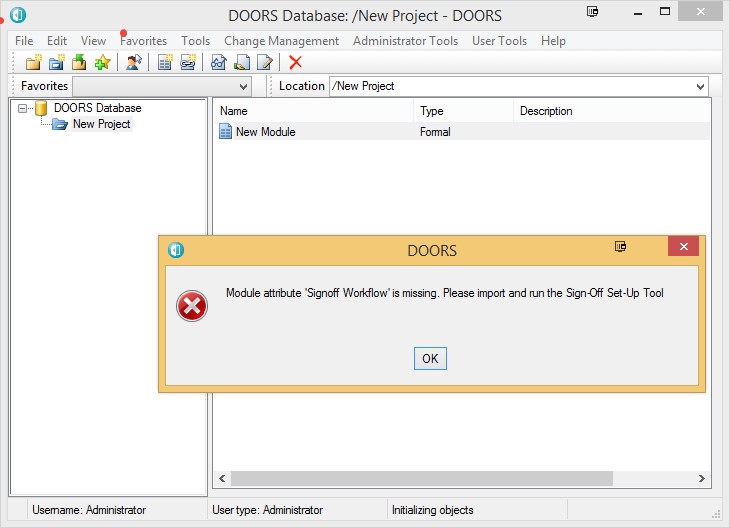
Can anyone help me regain my sanity? We have some DXL running on opening a module which I want to stop, but I cannot remember how we did it! It pops up an error message if a particular attribute is missing. We have our own toolset, but the routine being called is not in it, and if I run DOORS without specifying the tools directory the popup still appears. I have run a completely new database with one project and an empty module and reinstalled DOORS having ensured that the 9.5 directory is deleted! Still the popup appears. I have also checked that no triggers are set in the database. Any ideas or is it the asylum for me? TheRat - Wed Mar 26 21:34:25 EDT 2014 |
Re: Rogue Popup when opening a Module I would say trigger or module attribute. But if you've already checked for trigger and you tested a new db with a new empty module then that should rule those two out. Is there any actual message in this "Rogue Popup" ? |
Re: Rogue Popup when opening a Module kourosh - Thu Mar 27 16:40:37 EDT 2014 I would say trigger or module attribute. But if you've already checked for trigger and you tested a new db with a new empty module then that should rule those two out. Is there any actual message in this "Rogue Popup" ? I know what is running - it is one of our own tools. I just don't know How it is running - I have eliminated module attributes and triggers and something in the client install. What else can trigger dxl to run on opening a module? |
Re: Rogue Popup when opening a Module TheRat - Thu Mar 27 19:47:32 EDT 2014 I know what is running - it is one of our own tools. I just don't know How it is running - I have eliminated module attributes and triggers and something in the client install. What else can trigger dxl to run on opening a module? so, no database level trigger, no module level trigger, the module is completely empty (so, no DXL attributes for modules nor objects)... And you're sure that the files you use for your DOORS client installation have not been modified / customized? Perhaps your registry (local user or local machine) or a user / system variable (DOORSADDINS / …PROJECTADDINS) points to a directory that contains the scripts? But I'm not sure how this might trigger an auto-start of a script... really strange... |
Re: Rogue Popup when opening a Module The attached DXL rather slopily finds all DXL associated with the current module; Layouts, Attr-DXL, triggers in the Module, Project, Nested Projects, and database. Run it from an open module, copy the dxl output to Notepad, and curse me while trying to make sense out of it. DxlFind.dxl -Louie Attachments DxlFind.dxl |
Re: Rogue Popup when opening a Module llandale - Fri Mar 28 11:54:29 EDT 2014 The attached DXL rather slopily finds all DXL associated with the current module; Layouts, Attr-DXL, triggers in the Module, Project, Nested Projects, and database. Run it from an open module, copy the dxl output to Notepad, and curse me while trying to make sense out of it. DxlFind.dxl -Louie First off - thanks for engaging with this problem, hope we don't all end up in the asylum! Used Louie's code on a brand new, clean database (renamed the original data directory, add a new empty one and re-started the service). Opened it up without specifying a tools directory and after renaming my normal tools directory so nothing can be picked up from there. Created one project and one empty module. Opened the module and the popup appears (see attachment for screen shot) Initially the code found 2 dynamic triggers that I had set up in my original database - any idea how they get transferred to a new database? Deleted the triggers, closed the module, re-opened it, same result. Re-run the code, nothing now found! :- >>>>>>>>>>> Results Follow <<<<<<<<<<<<<< DxlFind.dxl for module 'New Module', </New Project/New Module> >>>>>>>>AttrDXL: none found >>>>>>>>LayoutDXL: none found >>>>>>>>TriggerDXL-Mod: none found >>>>>>>>TriggerDXL-Prj: none found >>>>>>>>TriggerDXL-Database: none found One of the triggers does call the code and it appears to keep running even after being deleted! Not only that, every time I open the database, the triggers re-appear, even after being deleted on the previous session. Attachments popup.jpg |
Re: Rogue Popup when opening a Module TheRat - Fri Mar 28 19:34:25 EDT 2014 First off - thanks for engaging with this problem, hope we don't all end up in the asylum! Used Louie's code on a brand new, clean database (renamed the original data directory, add a new empty one and re-started the service). Opened it up without specifying a tools directory and after renaming my normal tools directory so nothing can be picked up from there. Created one project and one empty module. Opened the module and the popup appears (see attachment for screen shot) Initially the code found 2 dynamic triggers that I had set up in my original database - any idea how they get transferred to a new database? Deleted the triggers, closed the module, re-opened it, same result. Re-run the code, nothing now found! :- >>>>>>>>>>> Results Follow <<<<<<<<<<<<<< DxlFind.dxl for module 'New Module', </New Project/New Module> >>>>>>>>AttrDXL: none found >>>>>>>>LayoutDXL: none found >>>>>>>>TriggerDXL-Mod: none found >>>>>>>>TriggerDXL-Prj: none found >>>>>>>>TriggerDXL-Database: none found One of the triggers does call the code and it appears to keep running even after being deleted! Not only that, every time I open the database, the triggers re-appear, even after being deleted on the previous session. Only we "we don't all end up in the asylum" is if you avoid it; good luck to you with that. While the [1] Triggers you discovered are for Discussions and Comments, the name of your offending attribute [2] "Signoff Workflow" suggests something else. [1] I know the newer DOORS have two automatic dynamic database wide triggers, for "drag" and "drop" "events" for "Discussions" (or is it "Comments"). Sadly, I've never actually used those features. My TrigReport finds them:
But you can delete "dynamic" triggers, but I see they are re-installed when you next log into the database. I assume therefore that the DOORS startup code creates them for the current DOORS session (just like the more standard Module-level dynamic triggers are created when the module is opened, or it opens some dialog box). [2] "Signoff Workflow" sounds more like a some other kind of Integration than a "Commens/Discussion" thing; I wonder if you have such an integration assigned to THIS database; meaning 36677@Whatever. Perhaps "Synergy" is integrated with your database? -Louie Unfortunately, I know nothing about Discussions, Comments, or Synergy other than I just related. |
Re: Rogue Popup when opening a Module TheRat - Fri Mar 28 19:34:25 EDT 2014 First off - thanks for engaging with this problem, hope we don't all end up in the asylum! Used Louie's code on a brand new, clean database (renamed the original data directory, add a new empty one and re-started the service). Opened it up without specifying a tools directory and after renaming my normal tools directory so nothing can be picked up from there. Created one project and one empty module. Opened the module and the popup appears (see attachment for screen shot) Initially the code found 2 dynamic triggers that I had set up in my original database - any idea how they get transferred to a new database? Deleted the triggers, closed the module, re-opened it, same result. Re-run the code, nothing now found! :- >>>>>>>>>>> Results Follow <<<<<<<<<<<<<< DxlFind.dxl for module 'New Module', </New Project/New Module> >>>>>>>>AttrDXL: none found >>>>>>>>LayoutDXL: none found >>>>>>>>TriggerDXL-Mod: none found >>>>>>>>TriggerDXL-Prj: none found >>>>>>>>TriggerDXL-Database: none found One of the triggers does call the code and it appears to keep running even after being deleted! Not only that, every time I open the database, the triggers re-appear, even after being deleted on the previous session. Could it be you have an include file defined in one of your client side startup files? $DOORSHOME\lib\dxl\startup.inc $DOORSHOME\lib\dxl\startupFiles |
Re: Rogue Popup when opening a Module Thanks Gents for your assistance and sorry for my silence for the last few days. I have cancelled my reservation at the asylum and my DOORS install has returned to normal. A colleague suggested searching in every file on my entire C drive for the message being displayed. This found the problem - there was a "ghost" version of my config. files:- \AppData\Local\VirtualStore\Program Files (x86)\IBM\Rational\DOORS\9.5\lib\dxl\config\formalPopupFiles and this behaves exactly as the real client install. Just one question remains - how the hell did I get it in there in the first place? Anyway - thanks for your efforts. |
Re: Rogue Popup when opening a Module TheRat - Tue Apr 08 20:12:32 EDT 2014 Thanks Gents for your assistance and sorry for my silence for the last few days. I have cancelled my reservation at the asylum and my DOORS install has returned to normal. A colleague suggested searching in every file on my entire C drive for the message being displayed. This found the problem - there was a "ghost" version of my config. files:- \AppData\Local\VirtualStore\Program Files (x86)\IBM\Rational\DOORS\9.5\lib\dxl\config\formalPopupFiles and this behaves exactly as the real client install. Just one question remains - how the hell did I get it in there in the first place? Anyway - thanks for your efforts. Ding Ding Ding Ding gads that looks familiar; I found something like that in AppData. Wonder why I didn't recall and recomend looking there. And I did figure out how it got there at the time and resolved whatever the problem was by dealing with it. But I don't recall now. But now I have no choice but to sleep on it and it will probably come to me soon. I did find this folder, but don't see anything odd in it:
-Louie |