All, |
Re: Module opening is very very slow
Ken. |
Re: Module opening is very very slow mcnairk - Thu Sep 17 08:05:14 EDT 2009
Ken. 1. What is the default view; does it have any layout DXL? Change to the standard view. Default view is not the standard view. Yes, Only one layout dxl in the module. 2. Do you have any triggers set? Delete them. No triggers 3. Which version of DOORS do you have? DOORS 8.3 Regards, Muruga |
Re: Module opening is very very slow
Some possibilities if the module opens slowly only for some users:
|
Re: Module opening is very very slow 1700 objects isn't much but if you have 500 sections in there, that would contribute to slow loading times. AAI Services, Textron dpechacek@sc-aaicorp.com David.Pechacek@gmail.com |
Re: Module opening is very very slow The following may help in determining the problem.
string    NameMod = "Attr-LayoutDXL Errors" // Put module name here
Module  mod = module(item NameMod)
//ModName_      mn = module(NameMod)
if (!null mod and confirm("Close module?")) close(mod)

bool  Visible  = confirm("Open module Visibly?")
bool  DefView  = confirm("[Confirm] to use Default view; [Cancel] for standard view")

noError()
int     TimeStart = intOf(today)
if (confirm("[Confirm] to open Read; [Cancel] to open Shared"))
     read (NameMod, Visible, DefView)
else share(NameMod, Visible, true, DefView)

infoBox("open time = " (intOf(today) - TimeStart) " seconds.")
lastError()
|
Re: Module opening is very very slow dpechacek - Thu Sep 17 10:10:32 EDT 2009 I clicked on Setup for sharing level 2 -> there are 120 sections created. Can we remove the sharable edit setup? What this level's talk about? If I setup module in a sharable edit @ Level 2, means Users can lock only level 2 objects??? Correct me If I am wrong, My understanding is If i setup a module in a sharable edit mode, It's basically un-inherit the access from Parent, So that facility provides the users to lock the objects? So, In future.. I we added any new objects.. instaed of setting up the module once again in a sharable edit mode & creating new sections again, We can just remove the inherit access from parent... Please advice.. Regards, Muruga |
Re: Module opening is very very slow llandale - Thu Sep 17 16:38:47 EDT 2009 The following may help in determining the problem.
string    NameMod = "Attr-LayoutDXL Errors" // Put module name here
Module  mod = module(item NameMod)
//ModName_      mn = module(NameMod)
if (!null mod and confirm("Close module?")) close(mod)

bool  Visible  = confirm("Open module Visibly?")
bool  DefView  = confirm("[Confirm] to use Default view; [Cancel] for standard view")

noError()
int     TimeStart = intOf(today)
if (confirm("[Confirm] to open Read; [Cancel] to open Shared"))
     read (NameMod, Visible, DefView)
else share(NameMod, Visible, true, DefView)

infoBox("open time = " (intOf(today) - TimeStart) " seconds.")
lastError()
I will test it today and reply. Regards, Murugaraj, S |
Re: Module opening is very very slow I have a problem. I take 20mins to open a module I have a module baselined, with all the object purged, with no shareable edit sections, with few views. I tried to open from defferent user and machine the result is the same I have 3000 objects, 5000 links. If i open stanard view it opens very fast (3 second). I have no dxl layout or triggers. I have three dxl attributes quite time consuming but none of them in the default view. Do attributes DXL have impact also if they are not in the default view? If i try with a script to compute the dxl attribute for each object there is not particoular object that a longer time than the others. Anyway i have other module with similar size and same dxl attribute in the default view (with no baseline, more views) that take much less time to open.
One last thing if i try to open in shareable edit i have memory access error |
Re: Module opening is very very slow bungle_77 - Mon Jun 30 06:35:58 EDT 2014 I have a problem. I take 20mins to open a module I have a module baselined, with all the object purged, with no shareable edit sections, with few views. I tried to open from defferent user and machine the result is the same I have 3000 objects, 5000 links. If i open stanard view it opens very fast (3 second). I have no dxl layout or triggers. I have three dxl attributes quite time consuming but none of them in the default view. Do attributes DXL have impact also if they are not in the default view? If i try with a script to compute the dxl attribute for each object there is not particoular object that a longer time than the others. Anyway i have other module with similar size and same dxl attribute in the default view (with no baseline, more views) that take much less time to open.
One last thing if i try to open in shareable edit i have memory access error I don[t know anythnig about "Memory access Error", but it seems you need to get the Administrator to run the Intergity Checker. I notice that all the module's Triggers, Layouts, and Attr-DXL get interpreted (but not run) whenever you open a module. That is linearly time consuming. But no, attr-DXL and layouts in some other view are not run when you open a view that does not contain them. [] Check for opened modules. From the Explorer Tools menu >>Manage Open Modules... I'm guessing you DO have Dxl running that openes a bunch of other modules. Open that, check it out, open your module, check it out. [] Open the module using the standard view: Run this DXL when the module is closed.
[] Open the module invisibly:
[] I think you do have DXL you don't know about. Download "DxlFind.dxl" here, and run it on your open module. Struggle through the sloppy print outs. -Louie |
Re: Module opening is very very slow llandale - Mon Jun 30 14:35:21 EDT 2014 I don[t know anythnig about "Memory access Error", but it seems you need to get the Administrator to run the Intergity Checker. I notice that all the module's Triggers, Layouts, and Attr-DXL get interpreted (but not run) whenever you open a module. That is linearly time consuming. But no, attr-DXL and layouts in some other view are not run when you open a view that does not contain them. [] Check for opened modules. From the Explorer Tools menu >>Manage Open Modules... I'm guessing you DO have Dxl running that openes a bunch of other modules. Open that, check it out, open your module, check it out. [] Open the module using the standard view: Run this DXL when the module is closed.
[] Open the module invisibly:
[] I think you do have DXL you don't know about. Download "DxlFind.dxl" here, and run it on your open module. Struggle through the sloppy print outs. -Louie I run the script and i found the dxl attribute i know but also this ttrigger: >>>>>>>>TriggerDXL-Database 'dynamic 1': FoundIn 'Database' post-drop-object:
Do you know what is it and how to remove it? How can i locate a trigger?
What i found very strange is: if i open the module with standard view it take very few time. If i open the module with a view with no DXL attribute but not standard it take very long time (also if i open in read only mode). Furthermore now i deleted almost all the view leaving just a view with some dxl attribute as default and not it take very few time to open, i also runned the DXLfind script on this module and i found the same triggers file.Anyway i need those views i deleted so it's not a solution for my issue |
Re: Module opening is very very slow bungle_77 - Wed Jul 02 05:25:35 EDT 2014 I run the script and i found the dxl attribute i know but also this ttrigger: >>>>>>>>TriggerDXL-Database 'dynamic 1': FoundIn 'Database' post-drop-object:
Do you know what is it and how to remove it? How can i locate a trigger?
What i found very strange is: if i open the module with standard view it take very few time. If i open the module with a view with no DXL attribute but not standard it take very long time (also if i open in read only mode). Furthermore now i deleted almost all the view leaving just a view with some dxl attribute as default and not it take very few time to open, i also runned the DXLfind script on this module and i found the same triggers file.Anyway i need those views i deleted so it's not a solution for my issue You should find two database level dynamic triggers. These have to do with Comments/Discussions and you can ignore them. The DxlFind script should also have found all your Attr-DXL and also all your Layouts. Perhaps you should post the results in an attached file. By your description, your default view seems to have some ineffecient Layout DXL. Perhaps it is opening modules, following links, and closing modules. If so, the view should SCROLL very slowly, and not just LOAD very slowly. Another guess is that you have dependancies on your views. If view "A" is defined to get its unsaved settings from view "B", then when loading "A" doors first pre-loads "B". Thus, "B" with the ineffecient layout or attr-DXL may be your problem. Check out Views menu >>Manage Views.. -Louie Pre-loading: doors does not figure out which settings it should retrieve from the dependant view B, it just loads B and then loads A. If B is dependant on C, then well C is loaded 1st. If C is dependant on A then you have violated the natural laws of the universe and there is no saying what may happen. |
Re: Module opening is very very slow llandale - Wed Jul 02 14:02:31 EDT 2014 You should find two database level dynamic triggers. These have to do with Comments/Discussions and you can ignore them. The DxlFind script should also have found all your Attr-DXL and also all your Layouts. Perhaps you should post the results in an attached file. By your description, your default view seems to have some ineffecient Layout DXL. Perhaps it is opening modules, following links, and closing modules. If so, the view should SCROLL very slowly, and not just LOAD very slowly. Another guess is that you have dependancies on your views. If view "A" is defined to get its unsaved settings from view "B", then when loading "A" doors first pre-loads "B". Thus, "B" with the ineffecient layout or attr-DXL may be your problem. Check out Views menu >>Manage Views.. -Louie Pre-loading: doors does not figure out which settings it should retrieve from the dependant view B, it just loads B and then loads A. If B is dependant on C, then well C is loaded 1st. If C is dependant on A then you have violated the natural laws of the universe and there is no saying what may happen. The default view has only three columns with no layout dxl and not dxl attribute and no depndencies. I solved the problem removing the text color dependency of a column from another attribute (no DXL attribute) How can it be possible?
Attachments ManageViews1.png ManageViews2.png |
Re: Module opening is very very slow bungle_77 - Thu Jul 03 06:21:12 EDT 2014 The default view has only three columns with no layout dxl and not dxl attribute and no depndencies. I solved the problem removing the text color dependency of a column from another attribute (no DXL attribute) How can it be possible?
You say attribute that controls the color is not attr-DXL. Well, NOW you have me curious. I use text color attributes quite a bit, deliberatalty greying out columns that the user is not allowed to modify, such as attr-DXL columns. Maybe you could tell us about that other attribute and which column was using it for its color. Also, is it just LOADING slowly or does it also SCROLL slowly? -Louie |
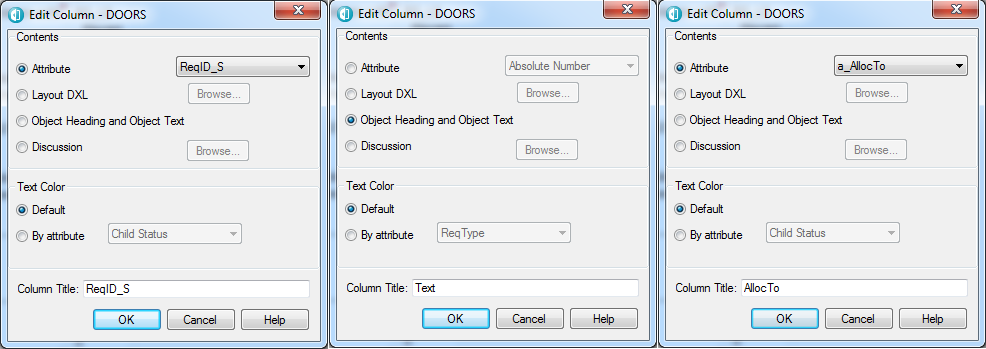
Re: Module opening is very very slow llandale - Thu Jul 03 11:37:17 EDT 2014 You say attribute that controls the color is not attr-DXL. Well, NOW you have me curious. I use text color attributes quite a bit, deliberatalty greying out columns that the user is not allowed to modify, such as attr-DXL columns. Maybe you could tell us about that other attribute and which column was using it for its color. Also, is it just LOADING slowly or does it also SCROLL slowly? -Louie I am sorry i was wrong it's not matter of the text color attribute. I attach the screenshot of the module with the default view and the detail of the coloumns. All the three attribute in the columns aree NO DXL attribute. I can scroll quite fast. Here the detail of the FindDXL script
>>>>>>>>>>> Results Follow <<<<<<<<<<<<<< Attachments columns.png Module.png |
Re: Module opening is very very slow bungle_77 - Thu Jul 03 12:03:22 EDT 2014 I am sorry i was wrong it's not matter of the text color attribute. I attach the screenshot of the module with the default view and the detail of the coloumns. All the three attribute in the columns aree NO DXL attribute. I can scroll quite fast. Here the detail of the FindDXL script
>>>>>>>>>>> Results Follow <<<<<<<<<<<<<< Close all other modules.
Load the standard view
Then insert each attr-DXL individually, and see which one causes problems. -Louie |
Re: Module opening is very very slow llandale - Thu Jul 03 13:41:30 EDT 2014 Close all other modules.
Load the standard view
Then insert each attr-DXL individually, and see which one causes problems. -Louie thos DXL attributes are not presente in the view and furthermore if i delete some of the views and i keep all the DXL attributes the module open in 5 seconds. Anyway i will make your test. Do i need to insert the dxl attribute as columin of the view? |
Re: Module opening is very very slow bungle_77 - Fri Jul 04 04:24:51 EDT 2014 thos DXL attributes are not presente in the view and furthermore if i delete some of the views and i keep all the DXL attributes the module open in 5 seconds. Anyway i will make your test. Do i need to insert the dxl attribute as columin of the view? I inserted each attribute in the view and it take very few time for each of them |
Re: Module opening is very very slow bungle_77 - Fri Jul 04 04:35:20 EDT 2014 I inserted each attribute in the view and it take very few time for each of them OK. I have a memory in the past where some modules opened rediculously slowly, and I deduced it was because of the excessive number of views and the terrible connection. I'm now guessing that perhaps sometimes the view database file is getting, well not "corrupted" but perhaps "ineffecient". I'm wondering if the following may be reasonable:
[1] Make a clone of the module -Louie |
Re: Module opening is very very slow llandale - Mon Jul 07 12:14:12 EDT 2014 OK. I have a memory in the past where some modules opened rediculously slowly, and I deduced it was because of the excessive number of views and the terrible connection. I'm now guessing that perhaps sometimes the view database file is getting, well not "corrupted" but perhaps "ineffecient". I'm wondering if the following may be reasonable:
[1] Make a clone of the module -Louie Thanks Louie. I think the same too, something is corrupted in the views, because as i said before if i delete some of the views the module opens very fast. I can also create a view with all the dxl attribute and the module opens very fast. |