Hey there, I wrote a script which writes certain attributes from a DOORS module into a Powerpoint template file. This *.pptx lies on a Sharepoint Server. The Script works perfectly fine if I use the local installation of DOORS. If access DOORS via Citrix, I can't figure out how to access the file. I know for local files (while connected via Citrix) I've to use: \\Client\C$\ Any suggestions how it would look like for a URL? Thanks, Tillmann t.schatz - Tue Apr 07 07:39:40 EDT 2015 |
Re: Access file on Sharepoint Server while using Doors via Citrix Are you using the Citrix Web client or ICA client? You need to make sure that the UNC path or the share is actually available when you actually launch DOORS via Citrix. An easy test to check this is, once you are logged into DOORS via Citrix then from the menu select File > Restore > Project... then click the "Browse" button and try putting \\Client\C$\ in the File name location and see if that displays the contents of this location. It has been a while since I've tested things in Citrix but previously I noticed when you launch DOORS via a Citrix web content, it actually does it via some temp Citrix session and so that session might not have access to the UNC path you are trying to save to... |
Re: Access file on Sharepoint Server while using Doors via Citrix You need to be aware, that when the DOORS client runs on citrix, then it is running on an entirely different machine on the network (not on your local PC). That means:
a) You may or may not have access to the URL from that machine Every COM component that you use, must be installed on the Citrix Host and invoking COM components must be allowed. I am not sure, how your script works - my guess is you are using COM to access Powerpoint? In any case instead of the case of different domains you should be able to use the URL in the same way on your local machine and on the Citrix Host. You need to come with a more verbose error description to help you more with this issue. Regards, Mathias |
Re: Access file on Sharepoint Server while using Doors via Citrix Hey kourosh, hey Mathias, thanks for your answers! @kourosh: I'm using Citrix as a ICA client (at least I get ICA as a return when I run getenv("Sessionname")) I have access to the clients harddrive, but not to the clients network shares.
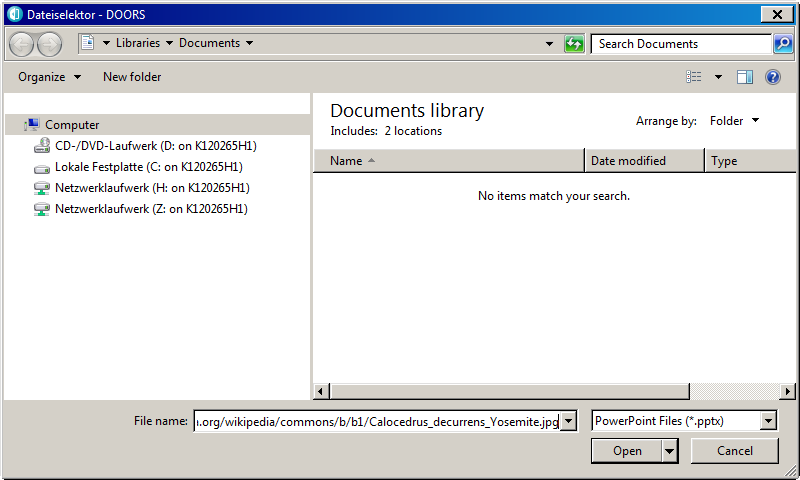
@Mathias:If I feed the powerpoint as a local file (while using citrix) the script works fine, so my guess is that the problem lies first with the access rights to the Sharepoint Server, and second to accessing web content from DOORS (using citrix) in general. I tested pulling an image from a public webserver. If I just pass the URL it does not work. If I use the DBE fileName function and paste the URL there (manually within the browse dialog box, see picture), something like this will be the filepath:
If I run a check on that filepath:
if (fileExists_(templateFile) == true)
{
    infoBox("works")
}
else
{
    errorBox "doesn't work"
}
I can access it. So for starters do you have any advice how to trigger the generation of this temporary link to the file without using DBE fileName function?
Attachments 08-04-2015 09-04-41.png |