Rational Requirements Composer (RRC) Trace Links Explorer
The RRC Trace Links Explorer is a RRC 3.0.1 server add-on (you can download from here) that allows viewing and managing requirements information in a rich, visual environment. The trace links explorer provides an uncluttered trace view, from a root requirements artifact, though related requirements, to related development and test artifacts.
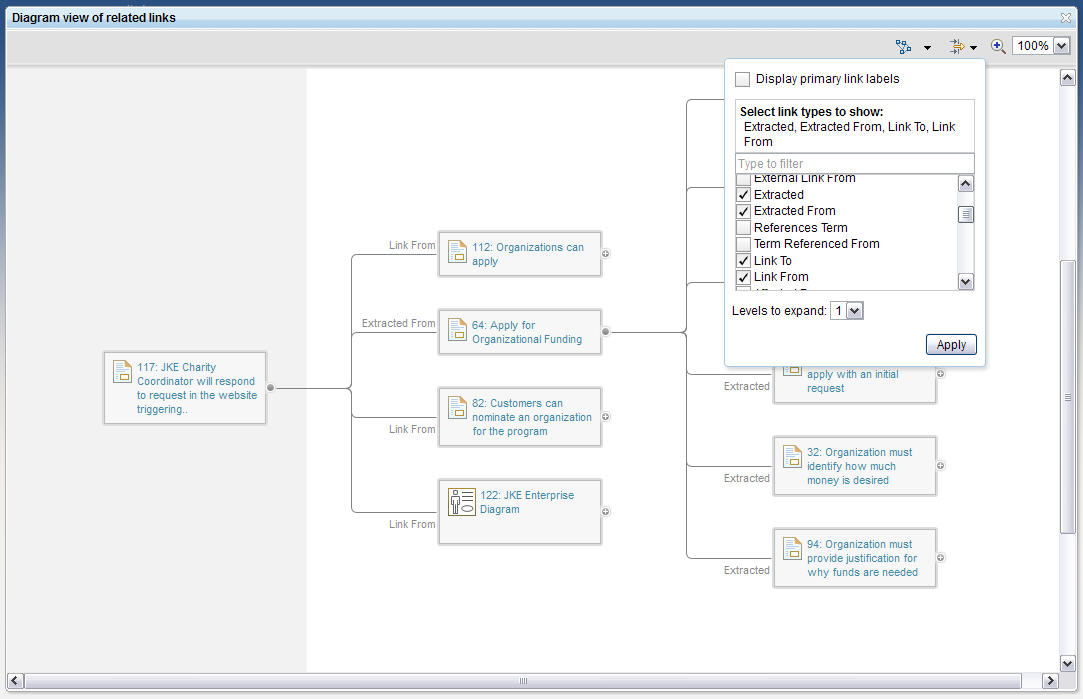
The RRC Trace Links Explorer starts with focus on a single information artifact and presents it in the context of the selected related artifacts - you select the link types to show in the tree view. Links can be created, deleted, and explored to see the additional detail on any artifact in the graphical display. Attributes and linked information that are not relevant to your current view are not displayed, but hovering over the nodes will provide a rich hover with the details of that artifact.
Installation Instructions
The following instructions are for Tomcat running on Windows. <server-install-directory> refers to where the Jazz Team Server is installed. In Windows, the default directory is C:\Program Files\IBM\JazzTeamServer
- Stop the server, if it is running.
- Download the LinksExplorer.zip file and extract on to <server-install-directory>. In Windows, you can do this by right clicking on the zip file, selecting Extract, and selecting the <server-install-directory> directory.
- Check that you have extracted the file correctly: You should have a new \linkexp_licenses folder under <server-install-directory>
- Restart the server.
Navigate to an artifact, and expand the links section in the sidebar. When the trace link explorer is installed to Jazz Team Server 3.0.1, RRC Web UI adds a launch icon to the links panel in the sidebar of the artifact editor.