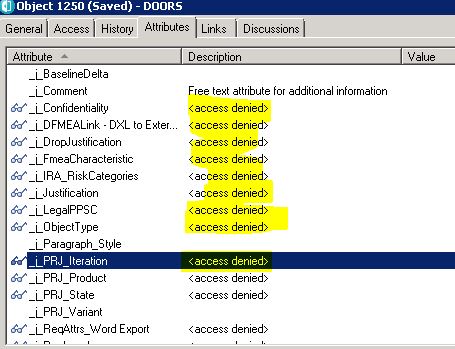
In a Doors formal module a user has a number of objects where they want to change an attribute value. They can do this one at a time by clicking on the attribute value in a column or they can do it all at once by selecting Properties (from the context menu) and changing the attribute value as required and clicking OK, where they get an option to apply the change to all selected objects.
Unfortunately .....
This only works if the user has Read access to the attribute definition 
So .....
I am faced with updating the access rights of 15 attributes in 30+ modules one at a time. OR
Writing a DXL script to do it for me. OR
Telling the user to update one at a time.
Making the changes manually is not really an option and although I don't mind writing a DXL script, jumping through all the security hoops to run it will be a pain. Is there anything else I can do? Or am I going to have to tell the user I can't help?
TIA
Mark
Mark@V - Thu Apr 21 11:31:50 EDT 2016
Re: Changing the attribute value on more than one object
DOORSHAM - Thu Apr 21 17:47:44 EDT 2016
You can filter on the objects then change the attribute value by use the properties gui all at the same time in one module
Re: Changing the attribute value on more than one object
Mark@V - Fri Apr 22 03:52:44 EDT 2016
DOORSHAM - Thu Apr 21 17:47:44 EDT 2016
You can filter on the objects then change the attribute value by use the properties gui all at the same time in one module
No he can't. The properties GUI will only allow him to change the value of attributes where he has read access to the attribute definition. Whoever set up the attributes and then copied them to multiple modules set his user group with no access.