Im trying to import word documents into DOORS, the documents contain tables as embedded word document objects. When I import the document into DOORS using the standard Export to DOORS tool, it duplicates the tables. The first instance as a word document object which can be activated, but does not display the contents, and then secondly as a metafile, which cannot be activated.
I have read a similar post in the old forum and the user resolved the issue by adding carridge returns between the object and the following text, however I have tried that but it didn't work.
Does anyone have any further suggestions?
Im using version 8.2
Jen_86 - Tue Mar 03 10:28:39 EST 2009 |
|
Re: Problem importing Word Docs into DOORS
Ron_Lewis - Tue Mar 03 13:08:33 EST 2009
The attached document with one embedded word document import into 8.1 correctly with an inline ole object that is editable as word document.
If this doesn't work -- you may have a configuration problem.
Attachments
attachment_14224031_testtesttest.doc
|
|
Re: Problem importing Word Docs into DOORS
Jen_86 - Wed Mar 04 04:12:36 EST 2009 Ron_Lewis - Tue Mar 03 13:08:33 EST 2009
The attached document with one embedded word document import into 8.1 correctly with an inline ole object that is editable as word document.
If this doesn't work -- you may have a configuration problem.
|
|
Re: Problem importing Word Docs into DOORS
kbmurphy - Wed Mar 04 12:17:05 EST 2009 Jen_86 - Wed Mar 04 04:12:36 EST 2009
I tried that test document and it still duplicates the table as a word object and a metafile. I have found that if I activate from DOORS the table that was created as word object and edit it, it does then display the contents. Bit of a pain having to do this for every table in the document though!
Are you running Windows XP? Which version of DOORS are you running? Which version of Word? Have you tried saving the module, closing it, and re-opening (I know, stupid question, but I have to ask....) Can you try the same thing with an Excel file or Visio diagram?
After an import from Word, the tables should show up in the OLE objects....
|
|
Re: Problem importing Word Docs into DOORS
SystemAdmin - Mon Mar 23 11:39:27 EDT 2009
On the subject of importing tables: We discourage the use of tables because they tend to obfuscate the actual requirements. Also, it is difficult to do traceability reviews when using tables in DOORS, because you have to link to every object on the "row" plus information in the "headings" to get the entire requirement. That said, getting information that is stored in MSWord tables into DOORS is often frustrating, or at best tedious. So - I created a methodology for using Excel to rebuild the requirements statements from MSWord tables. The method is very simple, using the CONCATENATE function in Excel. The converted text all ends up in a single column, which we copy to a document and save as RTF. Then we import the complete, repetitious, standalone requirements statements into DOORS as text objects. I attached a sample Excel file.
Attachments
attachment_14232395_Table_To_Text_Conversion_AscrubbedA.xls
|
|
Re: Problem importing Word Docs into DOORS
sammyc - Mon Mar 23 15:09:20 EDT 2009
As pointed out in the replies, you should have no trouble importing Word tables into DOORS as OLE objects. This is nice since the values that are imported for each cell each become their own requirement and can be traced for changes, etc. There is also a means to convert tables with columns into modules with attributes via dxl scripting - contact me directly if you would like to access the dxl scripts to do this.
|
|
Re: Problem importing Word Docs into DOORS
GavinGu - Wed Sep 09 06:22:22 EDT 2015 sammyc - Mon Mar 23 15:09:20 EDT 2009
As pointed out in the replies, you should have no trouble importing Word tables into DOORS as OLE objects. This is nice since the values that are imported for each cell each become their own requirement and can be traced for changes, etc. There is also a means to convert tables with columns into modules with attributes via dxl scripting - contact me directly if you would like to access the dxl scripts to do this.
Hi Sammyc,
Could you share the DXL scripts to convert tables with columns into modules with attributes, which is what I need badly now.
my email is gujianghe@foxmail.com
thanks a lot.
Gavin
|
|
Re: Problem importing Word Docs into DOORS
sammyc - Wed Sep 09 07:14:26 EDT 2015 GavinGu - Wed Sep 09 06:22:22 EDT 2015
Hi Sammyc,
Could you share the DXL scripts to convert tables with columns into modules with attributes, which is what I need badly now.
my email is gujianghe@foxmail.com
thanks a lot.
Gavin
Sent you an email with the contents.
Sam
|
|
Re: Problem importing Word Docs into DOORS
KBSri - Mon May 28 06:47:11 EDT 2018 sammyc - Wed Sep 09 07:14:26 EDT 2015
Sent you an email with the contents.
Sam
Hello All,
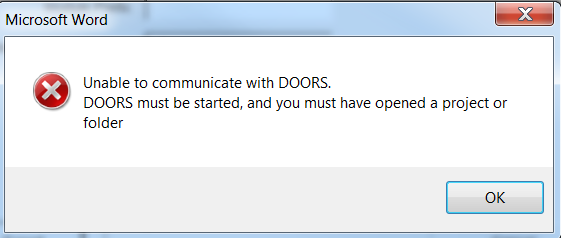
I tried closing outlook and also launched both word and DOORS as an administrator, but still did not work.
I have 50 documents to be imported, kindly let me know how can I do the import. The documents also has tables, diagrams and embedded objects etc.
Please help me out.
Regards
Attachments
Screenshot_DOORS_ImportError.png
|
|