Hello everybody,
in my DOORS module, I've defined two columns that specify Verification Method and Verification Stage for every requirement.
Both columns have Multi-valued Attributes (Enumeration Type) and the options are:
Verification Method:
Verification Stage:
-
Development
-
Qualification
-
Acceptance
Now, since a requirement can be verified in more than one Stage and with more than one Method, I'd like to associate a Verification Method to its corresponding Verification Stage.
My idea was trying to make appear on the same line the Verification Method and its corresponding Verification Stage. The problem is that the order in which values appear in columns is fixed and corresponds to the order in which the Enumeration options were defined in Types.
Therefore, if, for example, I wanted to verify the requirement with an Inspection in the Development Stage and with a Test in the Qualification Stage, for how my Types were defined, I'd see in the first line Test-Development and in the second line Inspection-Qualification... and I don't want it!
Moreover, if I want to perform a Test in both Qualification and Acceptance Stages there is no option to display Test on both lines!
Is there a way to create "Multiple" Multi-valued Attributes, that allow me to select multiple values that can appear more than once in the same column and in the same object?
Any other idea to solve my problem?
Thank you very much.
ZioAlfredo - Thu Aug 25 17:36:59 EDT 2011 |
|
Re: "Multiple" Multi-valued Attributes
llandale - Thu Aug 25 18:47:04 EDT 2011
You have a 'display' problem because you are not capturing the information you want to 'display'.
Perhaps you want 3 attributes with the same set of enumerations:
... Test
... Analysis
... Inspection
... Demonstration
The attributes could be called:
... Development Tests
... Qualification Tests
... Acceptance Tests
You could instead perhaps have 1 attibute called "Verification" with 4x3=12 enumerations
... Development Test
... Development Analysis
... Development Inspection
... Development Demonstration
... Qualification Test
... Qualification Analysis
... Qualification Inspection
... Qualification Demonstration
... Acceptance Test
... Acceptance Analysis
... Acceptance Inspection
... Acceptance Demonstration
|
|
Re: "Multiple" Multi-valued Attributes
ZioAlfredo - Thu Aug 25 19:04:36 EDT 2011 llandale - Thu Aug 25 18:47:04 EDT 2011
You have a 'display' problem because you are not capturing the information you want to 'display'.
Perhaps you want 3 attributes with the same set of enumerations:
... Test
... Analysis
... Inspection
... Demonstration
The attributes could be called:
... Development Tests
... Qualification Tests
... Acceptance Tests
You could instead perhaps have 1 attibute called "Verification" with 4x3=12 enumerations
... Development Test
... Development Analysis
... Development Inspection
... Development Demonstration
... Qualification Test
... Qualification Analysis
... Qualification Inspection
... Qualification Demonstration
... Acceptance Test
... Acceptance Analysis
... Acceptance Inspection
... Acceptance Demonstration
Is there a smarter solution?
Thanks Louie
|
|
Re: "Multiple" Multi-valued Attributes
SystemAdmin - Fri Aug 26 05:51:20 EDT 2011 ZioAlfredo - Thu Aug 25 19:04:36 EDT 2011
Yes, I've thought of that, but the point is that I actually have 6 options for Verification Method and 5 options for Verification Stage, so I would need 5x6=30 options for the new Verification Attribute!
Is there a smarter solution?
Thanks Louie
"Perhaps you want 3 attributes with the same set of enumerations:
... Test
... Analysis
... Inspection
... Demonstration
The attributes could be called:
... Development Tests
... Qualification Tests
... Acceptance Tests"
|
|
Re: "Multiple" Multi-valued Attributes
llandale - Sun Aug 28 18:02:52 EDT 2011 ZioAlfredo - Thu Aug 25 19:04:36 EDT 2011
Yes, I've thought of that, but the point is that I actually have 6 options for Verification Method and 5 options for Verification Stage, so I would need 5x6=30 options for the new Verification Attribute!
Is there a smarter solution?
Thanks Louie
You now have 30 possible options for testing for each requirement and thus must provide 30 options. Seems like 5 lists of 6 or one list of 30 covers the choices.
You could get carried away and have some target string attribute that gets populated by some Testing GUI, but 1 on that dialog you still have the 5x6 or 30 choice to make, or 2 the dialog could be "prompting" for a new test so you have two lists, one of 5 and one of 6 and say "OK", and it would ADD that test to the target string attribute. Don't see the point in any of that however.
|
|
Re: "Multiple" Multi-valued Attributes
SystemAdmin - Sun Aug 28 23:18:37 EDT 2011 ZioAlfredo - Thu Aug 25 19:04:36 EDT 2011
Yes, I've thought of that, but the point is that I actually have 6 options for Verification Method and 5 options for Verification Stage, so I would need 5x6=30 options for the new Verification Attribute!
Is there a smarter solution?
Thanks Louie
Such a matrix makes it clear as to what verification method will be used at any one verification stage, it also makes it easier to see which requirements will be verified across more than one stage. We call this matrix a Verification Cross Reference Matrix (VCRM)
We used to also have a "Pass\Fail" attribute for each verification stage as well to record the status of testing against each assigned verification method within DOORS, but these days all of the verification results are handled in a Test Management tool like HP Quality Centre.
Paul Miller
Melbourne, Australia
Attachments
attachment_14676983_VCRM-00.png
|
|
Re: "Multiple" Multi-valued Attributes
ZioAlfredo - Fri Sep 16 15:42:03 EDT 2011 SystemAdmin - Sun Aug 28 23:18:37 EDT 2011
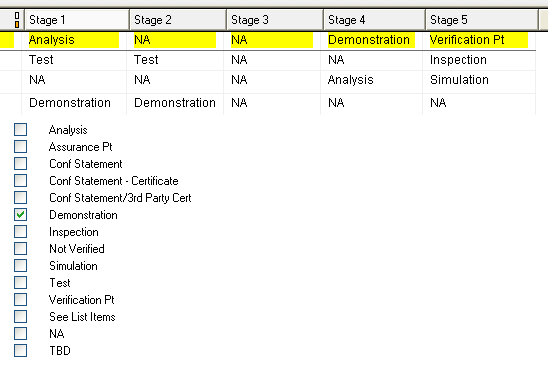
How about one attribute (column) per Verification Stage where each attribute uses the same base enumerated data type that lists all of the Verification Methods - see attached screen grab taken from a module that I'm working on right now and uses this matrix approach.
Such a matrix makes it clear as to what verification method will be used at any one verification stage, it also makes it easier to see which requirements will be verified across more than one stage. We call this matrix a Verification Cross Reference Matrix (VCRM)
We used to also have a "Pass\Fail" attribute for each verification stage as well to record the status of testing against each assigned verification method within DOORS, but these days all of the verification results are handled in a Test Management tool like HP Quality Centre.
Paul Miller
Melbourne, Australia
Do you know how to set the background color according to the value assigned to a column?
I'd like to see red background for those stages in which verification failed and green for those that the verification passed.
Thanks
|
|
Re: "Multiple" Multi-valued Attributes
SystemAdmin - Mon Sep 26 03:55:33 EDT 2011 ZioAlfredo - Fri Sep 16 15:42:03 EDT 2011
Thank you very much Paul, it was very helpful.
Do you know how to set the background color according to the value assigned to a column?
I'd like to see red background for those stages in which verification failed and green for those that the verification passed.
Thanks
This attribute will need to be defined to use a custom enumerated base data type that has at least two options, one for Pass and one for Fail, we just defined "P" or "F". These two choices should also be defined to be displayed in specific colors,e.g. Dark Green for Pass, Red for Fail. I assume that you know how to create enumerated base data types and define colors.
W.r.t. the view that displays the verification Stage attributes, insert the associated Results attributes after each Stage attribute - by using P & F as your two choices this allows these columns to be narrow.
For each column in the view that displays a verification Stage attribute, RH mouse click it's title cell, select properties and set the "Text Color" option to "By attribute", then select the associated Results attribute that will control which color will be used depending on whether P or F is chosen e.g when you select Pass in the Results attribute, it's corresponding Stage attribute should now display the verification method in the same color as defined for Pass. You may want to set the properties of each Results column in the same way - even though an attribute like the Results attribute has been defined to use colours, you still have to use the column properties feature to define it to use it's own colors.
Remember to save the view as these color properties are part of the view data.
We actually found managing test results like this to be a bit cumbersome, but in lieu of having a decent Test Management tool, then this might be the best way to visualise and track results status.
Paul Miller
Melbourne, Australia
|
|
Re: "Multiple" Multi-valued Attributes
ZioAlfredo - Mon Sep 26 09:31:30 EDT 2011 SystemAdmin - Mon Sep 26 03:55:33 EDT 2011
To be able to do this you will need to create a Results attribute for each verification stage e.g "Stage1 Results", Stage2 Results".....
This attribute will need to be defined to use a custom enumerated base data type that has at least two options, one for Pass and one for Fail, we just defined "P" or "F". These two choices should also be defined to be displayed in specific colors,e.g. Dark Green for Pass, Red for Fail. I assume that you know how to create enumerated base data types and define colors.
W.r.t. the view that displays the verification Stage attributes, insert the associated Results attributes after each Stage attribute - by using P & F as your two choices this allows these columns to be narrow.
For each column in the view that displays a verification Stage attribute, RH mouse click it's title cell, select properties and set the "Text Color" option to "By attribute", then select the associated Results attribute that will control which color will be used depending on whether P or F is chosen e.g when you select Pass in the Results attribute, it's corresponding Stage attribute should now display the verification method in the same color as defined for Pass. You may want to set the properties of each Results column in the same way - even though an attribute like the Results attribute has been defined to use colours, you still have to use the column properties feature to define it to use it's own colors.
Remember to save the view as these color properties are part of the view data.
We actually found managing test results like this to be a bit cumbersome, but in lieu of having a decent Test Management tool, then this might be the best way to visualise and track results status.
Paul Miller
Melbourne, Australia
very useful tips.
Alfredo.
|
|