Hey,
we run a DOORS Server 9.x, that should be accessed from different companies. It works fine on port 1025, but some companies have firewall restriction. Therefore I would like to run DOORS on port 80. I know there is a limit to ports above 1025.
Therefore I would like to know:
• Just for fun: Why has DOORS this restriction?
• Does DOORS or IBM/Telelogic offer some features to bypass this issue?
• Can I encrypt the connection?
Thanks in advance
Steffen
Steffen@GFU - Tue May 12 11:31:45 EDT 2009 |
|
Re: DOORS Server accessed by the rest of the world
mcnairk - Tue May 12 12:11:03 EDT 2009
Steffen,
You don't say how you are accessing DOORS 8.2 remotely (Windoze Terminal Services, Citrix, or something else). We use Citrix via an IPSEC Encrypted VPN Tunnel. The clients access the Citrix server on port 80 and Citrix accesses DOORS on the default port 36678.
Ken.
|
|
Re: DOORS Server accessed by the rest of the world
Steffen@GFU - Tue May 12 13:53:25 EDT 2009 mcnairk - Tue May 12 12:11:03 EDT 2009
Steffen,
You don't say how you are accessing DOORS 8.2 remotely (Windoze Terminal Services, Citrix, or something else). We use Citrix via an IPSEC Encrypted VPN Tunnel. The clients access the Citrix server on port 80 and Citrix accesses DOORS on the default port 36678.
Ken.
We access der DOORS Server 9.x via the Client Installation of DOORS. So we installed on the server a service doorsd.exe -minstall .... and we start the client on other machines with doors.exe -d 1025@doors.server.net.
I hearded about the solution with CITRIX, Terminal Server etc., but I hope that DOORS supports a simple old fashion client-server approach.
Cheers
Steffen
|
|
Re: DOORS Server accessed by the rest of the world
llandale - Tue May 12 16:30:27 EDT 2009
What's the restriction? Are you saying you cannot use port 80 for DOORS? I've been using port 19101, and DOORS defaults to 36677 (which is 'doors' on the telephone keybad).
Don't know about putting the port@server outside your network, but if you DID then anybody could get at your DOORS even if they could not get at your licensing. Don't know about encrypting, but I presume it can be done.
It will be slow ... very slow. Citrix and Terminal Services is vastly faster since only screen shots travel between the DOORS client and the user's monitor, which is far less than the underlying data between doors client and server.
|
|
Re: DOORS Server accessed by the rest of the world
Steffen@GFU - Tue May 12 16:55:38 EDT 2009 llandale - Tue May 12 16:30:27 EDT 2009
What's the restriction? Are you saying you cannot use port 80 for DOORS? I've been using port 19101, and DOORS defaults to 36677 (which is 'doors' on the telephone keybad).
Don't know about putting the port@server outside your network, but if you DID then anybody could get at your DOORS even if they could not get at your licensing. Don't know about encrypting, but I presume it can be done.
It will be slow ... very slow. Citrix and Terminal Services is vastly faster since only screen shots travel between the DOORS client and the user's monitor, which is far less than the underlying data between doors client and server.
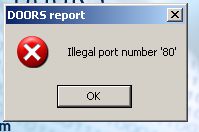
when I start "doors.exe -d 80@doors.server.net" from the bin ordner of the client installation doors prompts the attached file (illegal port.jpg).
See also next reply!
Attachments
attachment_14250980_illegal_port.jpg
|
|
Re: DOORS Server accessed by the rest of the world
Steffen@GFU - Tue May 12 17:01:21 EDT 2009 Steffen@GFU - Tue May 12 16:55:38 EDT 2009
Hello Louie,
when I start "doors.exe -d 80@doors.server.net" from the bin ordner of the client installation doors prompts the attached file (illegal port.jpg).
See also next reply!
About the solution with Terminal Service and Citrix: I think Citrix is a expensive solution, and maybe Terminal Service, too. We use Windows Server 2003 R2 as os for the client, and I don't know much about Terminal Service - do you have a quick guide to get an impression about the solution. About the performance issue, i think you are right.
Thanks
Steffen
Attachments
attachment_14250983_license_info.JPG
|
|
Re: DOORS Server accessed by the rest of the world
llandale - Wed May 13 17:42:39 EDT 2009 Steffen@GFU - Tue May 12 16:55:38 EDT 2009
Hello Louie,
when I start "doors.exe -d 80@doors.server.net" from the bin ordner of the client installation doors prompts the attached file (illegal port.jpg).
See also next reply!
Are you sure your clients have access to that server?
>Louie
|
|
Re: DOORS Server accessed by the rest of the world
Ron_Lewis - Mon May 25 16:40:19 EDT 2009 Steffen@GFU - Tue May 12 17:01:21 EDT 2009
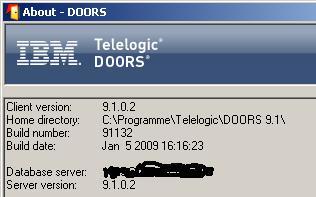
Don't know if I get it right (which is 'doors' on the telephone keybad), but the attached files shows some version infos.
About the solution with Terminal Service and Citrix: I think Citrix is a expensive solution, and maybe Terminal Service, too. We use Windows Server 2003 R2 as os for the client, and I don't know much about Terminal Service - do you have a quick guide to get an impression about the solution. About the performance issue, i think you are right.
Thanks
Steffen
|
|
Re: DOORS Server accessed by the rest of the world
Steffen@GFU - Thu May 28 05:08:02 EDT 2009 llandale - Wed May 13 17:42:39 EDT 2009
I see that the install guide says "We recommend you do not use a number lower than 1000.".
Are you sure your clients have access to that server?
>Louie
So that's still the state. We know try to use a VPN connection to bypass the firewall restriction, in accordance with our partners.
Thanks Louie
|
|
Re: DOORS Server accessed by the rest of the world
Steffen@GFU - Thu May 28 05:32:29 EDT 2009
DOORS 9.x seems not to allow to chose an individual port for communication between client/server.
So there are "two" soultions:
1. Using CITRIX, Windows Terminal Server etc.
2. Build a VPN network to bypass port restriction and encrypt the data.
|
|
Re: DOORS Server accessed by the rest of the world
Ron_Lewis - Thu May 28 07:10:45 EDT 2009 Steffen@GFU - Thu May 28 05:32:29 EDT 2009
DOORS 9.x seems not to allow to chose an individual port for communication between client/server.
So there are "two" soultions:
1. Using CITRIX, Windows Terminal Server etc.
2. Build a VPN network to bypass port restriction and encrypt the data.
|
|
Re: DOORS Server accessed by the rest of the world
Ron_Lewis - Thu May 28 08:00:14 EDT 2009 Ron_Lewis - Thu May 28 07:10:45 EDT 2009
Port 80 would never be a good choice because it is reserved for other functions.
|
|
Re: DOORS Server accessed by the rest of the world
Steffen@GFU - Thu May 28 09:44:04 EDT 2009 Ron_Lewis - Thu May 28 08:00:14 EDT 2009
On a Web server or Hypertext Transfer Protocol daemon, port 80 is the port that the server "listens to" or expects to receive from a Web client.
We are using DOORS in a small project, and therefore I would like to avoid any solution, that will be expensive (license, hardware). I would like to see DOORS give my the freedom to chose any port.
|
|
Re: DOORS Server accessed by the rest of the world
llandale - Thu May 28 10:29:50 EDT 2009 Steffen@GFU - Thu May 28 05:32:29 EDT 2009
DOORS 9.x seems not to allow to chose an individual port for communication between client/server.
So there are "two" soultions:
1. Using CITRIX, Windows Terminal Server etc.
2. Build a VPN network to bypass port restriction and encrypt the data.
Maybe I didn't read this right, but v9.x like all other DOORS versions indeed lets ..err.. actually insists that you specify a data 'input' port when installing the DOORS server. You specify this port when installing the clients. Somewhere there is also a 'return' port but frankly I don't understand that. 36677 is the default input port, 36678 is the default return port.
The client machines need to be able to access the server. I think that a DOS 'ping' command will verify that: from the client, open a black command-prompt window and issue "ping <server name>". Takes about 15 seconds and either you get ping times or error messages. Exit. Ping times in excess of 40ms will cause noticable delays when using DOORS.
The port needs to be accessible to the clients. I think that means that your firewall needs to be told to allow that server and its two ports rights to talk through the fire wall.
-Louie
|
|
Re: DOORS Server accessed by the rest of the world
Steffen@GFU - Tue Jun 09 05:50:03 EDT 2009 llandale - Thu May 28 10:29:50 EDT 2009
I have no experience using DOORS in a world setting, only within company's networks.
Maybe I didn't read this right, but v9.x like all other DOORS versions indeed lets ..err.. actually insists that you specify a data 'input' port when installing the DOORS server. You specify this port when installing the clients. Somewhere there is also a 'return' port but frankly I don't understand that. 36677 is the default input port, 36678 is the default return port.
The client machines need to be able to access the server. I think that a DOS 'ping' command will verify that: from the client, open a black command-prompt window and issue "ping <server name>". Takes about 15 seconds and either you get ping times or error messages. Exit. Ping times in excess of 40ms will cause noticable delays when using DOORS.
The port needs to be accessible to the clients. I think that means that your firewall needs to be told to allow that server and its two ports rights to talk through the fire wall.
-Louie
Might be interesting!
Steffen
|
|