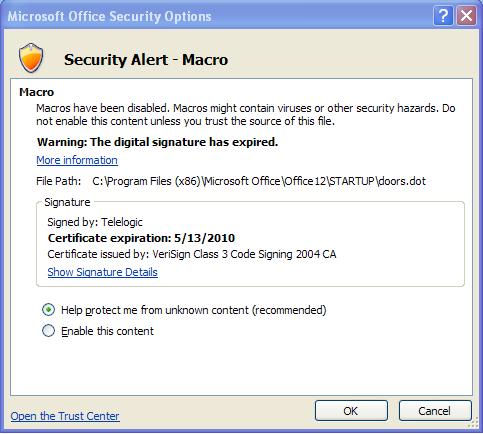
I have a couple of users that were getting a message when they start Word that says that the Telelogic Certificate expired on May 13, 2010. This is the same screen that has the option to "Always Trust Certificates from this Publisher" or some wording, but it's greyed out. |
Re: Telelogic Word Macro Certificate Expired See attached .jpg of expired message delivered to DOORS v9.1.03 client user. I actually had a user experience this same message this morning. They went into the Trust Center in Word and added the path to the existing doors.dot which now allows the Word to DOORS export button to continue to function with it's macro. HOWEVER comma, it still indicates the certificate has expired as of 5/13/2010. Actually I was hoping to find that a simple solution was going to be indicated here. My hunch is that short of un-installing & re-installing DOORS, there should be the ability to RENEW the certificate associated with the doors.dot is a viable solution. NOTE: so far it has not turned into a huge number of user calls for HELP, but it could...time will tell. gsdguy Attachments attachment_14476793_expired_5_13_2010_trust_cert.jpg |
Re: Telelogic Word Macro Certificate Expired http://www-01.ibm.com/support/docview.wss?uid=swg21431383 |
Re: Telelogic Word Macro Certificate Expired 1. Close Microsoft Word. 2. Go to in "C:\Program Files\Microsoft Office\OFFICE11\STARTUP\" 3. Rename old doors.dot file to doors.dot.old and place the attached doors.dot (from a DOORS 9.2 installation) in the above location 4. Open Microsoft Word again and you will see that the new macro is by IBM UK. 5. Check the option "Always trust macros from this publisher". Attachments attachment_14488887_doors.dot |