| Task: Perform Architectural Analysis |
| Roles | Primary Performer: | Additional Performers: |
|---|---|---|
| Inputs | Mandatory:
| Optional:
|
| Outputs |
|
|
SynopsisThe Enterprise Architect is responsible for defining the enterprise architecture, which includes making key decisions that constrain the overall plan and execution of the program. This task is where the impacts to the enterprise are assessed through analysis of the architecturally significant requirements and identification of architectural constraints, decisions and dependencies. 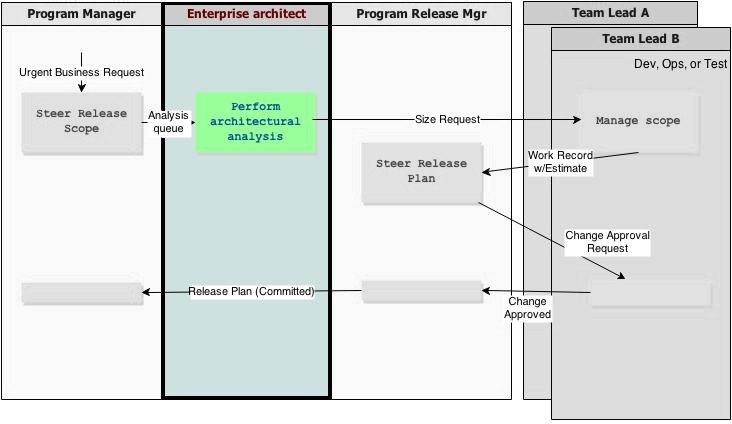
Steps
|
| Step | Tool guidance |
|---|---|
|
1 Place unsized features in "ready for analysis" queue When there are features in state "exploring" that have not been sized, the Enterprise Architect is notified of the Feature. |
<Tool-specific steps / online help> |
|
2 Determine Impacted Teams The Enterprise Architect reviews the Feature and examines the existing Enterprise Architecture to determine the applications/teams involved. |
<Tool-specific steps / online help> |
|
2.1 Create sizing requests The Enterprise Architect identifies the affected teams, and records these impacts as sizing requests for each team. |
<Tool-specific steps / online help> |
|
2.2 Scope of work The Enterprise Architect includes information about the proposed the work involved. |
<Tool-specific steps / online help> |
|
2.3 Notify teams The impacted teams are notified of the sizing request. |
<Tool-specific steps / online help> |
|
3 Follow-up The creation of sizing requests results in a notification to the Team Leads, who create work records associated with the Feature. The Program Release Manager negotiates a new committed release plan with the execution teams. Once the changes are approved all teams can commit to the release. |
<Tool-specific steps / online help>
|
Tutorial
See the Scenario: Interdependent Teams Respond to Urgent Business Need for detailed step-by-step guidance. Also see this demo.
Licensed Materials - Property of IBM |